

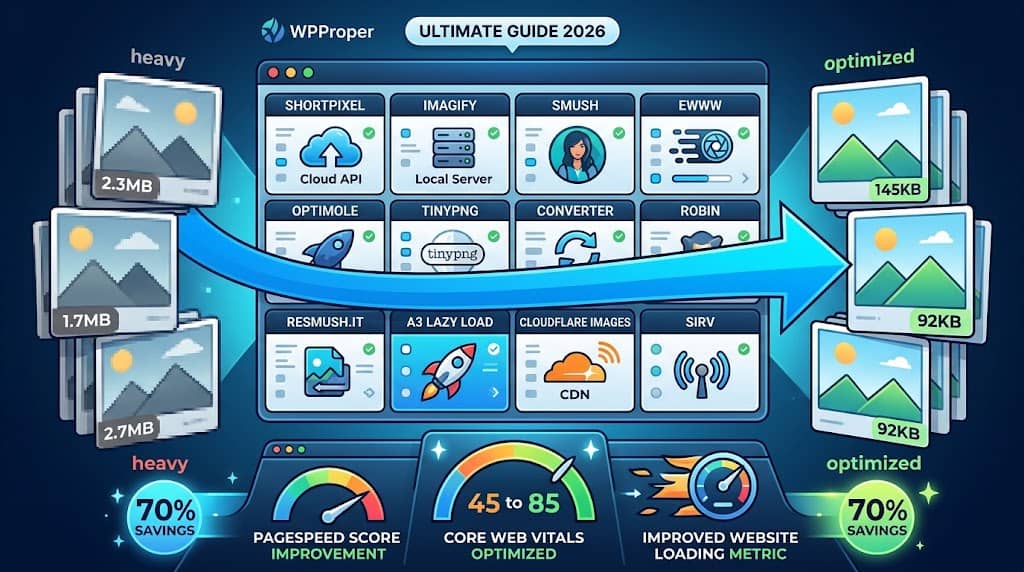
Images are the single largest contributor to page weight on most WordPress sites — unoptimised photographs uploaded at their original camera resolution can be several megabytes each, making pages load slowly even on fast connections. Since Google uses Core Web Vitals (specifically Largest Contentful Paint and page load speed) as direct ranking signals, and since mobile users on slower connections abandon sites that take more than a few seconds to load, choosing the best wordpress image optimization plugin is one of the highest-impact performance decisions a site owner can make.
This guide reviews the 12 best image compression plugin for wordpress options in 2026 — covering cloud-based compression services, self-hosted local optimisers, WebP conversion tools, and the most complete wordpress image optimizer solutions for sites of all sizes.
Why Image Optimisation Directly Affects Rankings and Revenue
A 1-second delay in page load time reduces conversions by approximately 7% and page views per session by 11%. Google’s PageSpeed Insights and Core Web Vitals scores — which directly influence search rankings — penalise unoptimised images through the “Serve images in next-gen formats,” “Properly size images,” and “Efficiently encode images” audit flags. The best image optimization plugin for wordpress resolves all three: converting images to WebP (30–35% smaller than JPEG at equivalent quality), compressing at upload, and generating resized versions for responsive image delivery via srcset.
The practical impact of a well-configured image compression wordpress plugin is typically a 30–70% reduction in total image payload on image-heavy pages — often the difference between a page scoring 45 and 85 on PageSpeed Insights.
📊 Quick Comparison Table
| Plugin | Free | WebP | Bulk Compress | CDN | Lazy Load | Method |
|---|---|---|---|---|---|---|
| 🏆 ShortPixel | ✔ | ✔ | ✔ | ✔ | ✔ | Cloud API |
| Imagify | ✔ | ✔ | ✔ | ✗ | ✔ | Cloud API |
| Smush | ✔ | ~ | ✔ | ~ | ✔ | Cloud + Local |
| EWWW Image Optimizer | ✔ | ✔ | ✔ | ✔ | ✔ | Local (server) |
| TinyPNG / Compress JPEG | ✔ | ~ | ✔ | ✗ | ✗ | Cloud API |
| Optimole | ✔ | ✔ | ✔ | ✔ | ✔ | Cloud CDN |
| Robin Image Optimizer | ✔ | ~ | ✔ | ✗ | ✗ | Local (server) |
| reSmush.it | ✔ | ✗ | ✔ | ✗ | ✗ | Free cloud API |
| Converter for Media | ✔ | ✔ | ✔ | ✗ | ✗ | Local WebP convert |
| a3 Lazy Load | ✔ | ✗ | ✗ | ✗ | ✔ | Lazy load only |
| Cloudflare Images | ~ | ✔ | ✔ | ✔ | ✔ | CDN + resizing |
| Sirv | ✔ | ✔ | ✔ | ✔ | ✔ | CDN + DAM |
✔ = Yes ✗ = No ~ = Partial / paid tier
12 Best WordPress Image Optimizer Plugins Reviewed
1
ShortPixel — Best Overall WordPress Image Optimization Plugin
ShortPixel is the most versatile and complete image optimizer wp plugin available, combining lossy, glossy, and lossless compression modes with automatic WebP and AVIF conversion, bulk optimisation of the existing media library, and a CDN (ShortPixel Adaptive Images) that serves the smallest possible image format to each visitor’s browser and device. The compression algorithm delivers industry-leading file size reduction — typically 30–60% for JPEG and PNG files at the glossy quality level — without visible quality loss.
On upload, ShortPixel automatically sends the image to its cloud API, compresses all registered WordPress thumbnail sizes and the original file, converts to WebP and AVIF, and replaces the files on the server — with the option to keep a backup of the original. The bulk optimizer processes the entire existing media library at configurable speed. PDFs can be compressed. The free tier provides 100 image credits per month (renewable); beyond that, image credits are purchased in affordable packages or via a monthly subscription. For sites of any size wanting the best wordpress image optimizer plugin with maximum quality-to-compression ratio and WebP/AVIF support, ShortPixel is the top recommendation.
✓ PROS
- Best quality-to-compression ratio (lossy/glossy/lossless)
- WebP and AVIF conversion included
- CDN with automatic format detection
- PDF compression support
✗ CONS
- Free tier limited to 100 images/month
- Cloud-based — requires internet for compression
Best for: Sites wanting best-in-class compression with WebP/AVIF conversion and CDN delivery | Pricing: Free (100 img/mo) + paid from $4.99/month
2
Imagify — Best Image Compression Plugin for WP Rocket Users
Imagify is the image compression plugin made by the same team behind WP Rocket, providing tight integration between image optimisation and the most widely used WordPress caching plugin. Imagify compresses images on upload, converts to WebP, and processes the existing media library in bulk. Three compression levels (Normal, Aggressive, Ultra) provide control over the quality vs. size trade-off. WP Rocket’s WebP serving configuration works automatically with Imagify-generated WebP files, making the combination the simplest path to a fully optimised image delivery stack for WP Rocket users.
The free tier processes 25 MB of images per month — sufficient for small sites uploading a modest number of images. For larger sites, the paid plan offers unlimited compression. Imagify also handles WooCommerce product image compression and supports compression of images not in the WordPress media library (images in theme files, for example). For WP Rocket users or sites wanting a straightforward three-level compression interface without the additional configuration of ShortPixel, Imagify is the most natural choice.
✓ PROS
- Perfect WP Rocket integration
- Simple 3-level compression interface
- WebP conversion included
✗ CONS
- Free tier limited to 25 MB/month
- No CDN
Best for: WP Rocket users wanting seamless image compression + WebP integration from the same team | Pricing: Free (25 MB/mo) + paid from $4.99/month
3
Smush — Best Free WordPress Image Compression Plugin
Smush by WPMU DEV is the most installed free best image optimizer wordpress plugin, with over 1 million active installations and a comprehensive free feature set. Smush automatically compresses images on upload (lossless by default), bulk-optimises the existing media library up to 50 images at a time, enables lazy loading for images across the site, and detects incorrectly sized images (images displayed smaller than their actual dimensions — a common WordPress issue that wastes bandwidth). The free version processes up to 5 MB per image.
WebP conversion and CDN delivery require Smush Pro (WPMU DEV membership), which limits the free version’s suitability for high-traffic sites where WebP is essential for Core Web Vitals. However, for small to medium sites that want reliable, automatic image compression with lazy loading and incorrect image size detection at no cost, Smush Pro’s free tier covers the essential workflow without requiring an API account or image credit system.
✓ PROS
- Most popular free compression plugin (1M+ installs)
- Lazy loading and incorrect image size detection free
- No API key or image credit system needed
✗ CONS
- WebP requires paid Pro plan
- Lossless only in free — less reduction than lossy alternatives
Best for: Smaller sites wanting a simple, free, zero-configuration image compression and lazy load solution | Pricing: Free + Pro from WPMU DEV $9/month
4
EWWW Image Optimizer — Best Local Server-Based Image Optimizer
EWWW Image Optimizer is unique among the leading image optimisation plugins in offering fully local server-side compression — the image files are compressed by tools running on the server itself (optipng, pngout, jpegtran, cwebp) rather than being sent to a cloud API. This means no image data leaves the server, no API credits are consumed, no monthly limits apply, and compression continues to work even if the cloud service is unavailable. For sites with privacy requirements or large media libraries where unlimited compression without API costs matters, EWWW’s server-side approach is a significant advantage.
WebP conversion is handled locally (when the server has the required libraries) or via the Easy IO CDN add-on. Bulk optimisation processes the entire media library without limits. The Easy IO CDN service (optional paid add-on) serves images from Cloudflare’s network with automatic format selection (WebP, AVIF) and responsive resizing. For budget-conscious sites or privacy-focused deployments wanting unlimited free compression without image credit systems, EWWW is the best best wordpress image optimizer option.
✓ PROS
- Fully local — no cloud API or credits needed
- Unlimited compression at no cost
- Best for privacy-conscious deployments
✗ CONS
- Compression quality lower than cloud services
- Requires server binaries (not always available on shared hosting)
Best for: Sites wanting unlimited free local compression without image credit limits or data leaving the server | Pricing: Free + Easy IO CDN from $7/month
5
Optimole — Best Image CDN Plugin for WordPress
Optimole takes a different architectural approach from most image optimisation plugins: rather than compressing image files stored on the WordPress server, Optimole offloads all image storage and delivery to its cloud CDN infrastructure. When activated, Optimole replaces the URLs of all images on the site with its CDN URLs — automatically serving WebP to browsers that support it, resizing images to the exact dimensions needed for each visitor’s viewport, compressing based on the network connection speed detected, and lazy loading all images — without storing modified files on the server or touching the WordPress media library files.
This approach produces the maximum possible image performance improvement without any local file management. The free tier handles 5,000 monthly visits; beyond that, paid plans scale with traffic. For WooCommerce product catalogues, image-heavy portfolios, and any high-traffic WordPress site where image delivery performance is the primary concern, Optimole’s CDN-first model outperforms local compression tools.
✓ PROS
- CDN-first: maximum performance without local files
- Automatic viewport-based image resizing
- Network-aware compression quality
✗ CONS
- Images served from Optimole servers — not self-hosted
- Free tier limited to 5,000 visits/month
Best for: High-traffic image-heavy sites wanting maximum CDN image performance without local file management | Pricing: Free (5K visits) + paid from $19/month
6
TinyPNG / Compress JPEG & PNG — Best Straightforward Compression API Plugin
The official TinyPNG WordPress plugin (“Compress JPEG & PNG images”) integrates the TinyPNG/TinyJPEG compression API directly into WordPress — the same compression used by millions of developers via the web interface and developer API. TinyPNG uses smart lossy compression that reduces JPEG and PNG file sizes significantly while preserving visual quality. The plugin automatically compresses images on upload and processes all registered WordPress thumbnail sizes in addition to the original. Bulk compression of the existing media library is supported via the plugin interface.
✓ PROS
- Industry-trusted TinyPNG compression algorithm
- 500 free compressions/month per API key
- Dead-simple setup — API key + activate
✗ CONS
- No WebP conversion or CDN
- No lazy loading
Best for: Sites wanting straightforward TinyPNG compression without additional features | Pricing: Free (500 compressions/mo) + pay-as-you-go
7
Converter for Media — Best Free Local WebP Conversion Plugin
Converter for Media focuses specifically on WebP (and AVIF) conversion of existing WordPress media library images — converting JPEG, PNG, and GIF files to WebP format locally on the server without sending files to any external API. The converted WebP files are stored alongside the originals and served automatically to browsers that support WebP via the plugin’s built-in rewriting logic. This is the cleanest, free, self-hosted approach to resolving Google’s “Serve images in next-gen formats” PageSpeed audit flag.
✓ PROS
- Completely free WebP/AVIF conversion
- Local — no API or credits
- Solves PageSpeed “next-gen formats” flag free
✗ CONS
- No compression — converts format only, not size
- Requires GD or Imagick with WebP support on server
Best for: Sites wanting free local WebP conversion without a cloud API to fix the PageSpeed next-gen formats audit | Pricing: Free + Pro from $49/year
8
Robin Image Optimizer — Best Background Queue Image Optimizer
Robin Image Optimizer runs image compression as a background queue job rather than compressing images synchronously on upload — meaning uploads complete immediately and compression happens in the background without blocking the editor interface. This is particularly valuable on shared hosting where synchronous API calls during upload can cause timeouts. Robin works locally on the server using standard image libraries (GD, Imagick) without an external API. The queue-based approach also makes bulk optimization of large media libraries non-disruptive.
✓ PROS
- Background queue — upload experience not affected
- Local server — no API or limits
- Free with no credit system
✗ CONS
- No WebP conversion
- Less compression than cloud API services
Best for: Shared hosting sites wanting background-queue compression that doesn’t block uploads | Pricing: Free + Pro from $39/year
9
reSmush.it — Best Completely Free No-Limit Image Optimizer
reSmush.it is the only image optimisation plugin that is completely free with no credit limits, no monthly caps, and no paid tier — using the open-source reSmush.it API to compress JPEG, PNG, GIF, and BMP images. The API applies lossy compression to reduce file sizes without requiring an account or API key. While compression quality is not as refined as TinyPNG or ShortPixel, the service is adequate for standard blog images and is the most appropriate choice for sites with strict zero-budget constraints that still want automated compression.
✓ PROS
- 100% free — no limits, no account, no API key
- Automatically optimises on upload
- Bulk optimizer available
✗ CONS
- No WebP conversion or CDN
- Compression quality below premium services
Best for: Zero-budget sites wanting any level of automatic free compression without limits or account registration | Pricing: 100% Free
10
a3 Lazy Load — Best Dedicated Lazy Load Plugin
a3 Lazy Load is a dedicated lazy loading plugin rather than a compression tool — it defers loading of images, iframes, and videos until they are about to enter the visible viewport, rather than loading all page assets simultaneously. This reduces initial page load time and the amount of data transferred for visitors who don’t scroll to the bottom of the page. While WordPress 5.5+ includes native lazy loading for images, a3 Lazy Load extends this to iframes (YouTube embeds, Google Maps), background images in CSS, and videos — areas native WordPress lazy load does not cover.
✓ PROS
- Extends lazy load to iframes, videos, and backgrounds
- Completely free
- Lightweight — single-purpose
✗ CONS
- No compression — lazy load only
- Native WordPress lazy load covers basic cases
Best for: Sites with many YouTube embeds or iframes wanting extended lazy loading beyond native WordPress capability | Pricing: Free
11
Cloudflare + Cloudflare Images — Best CDN-Level Image Optimisation
Cloudflare’s free plan includes Polish (image compression and WebP conversion at the CDN edge), Mirage (mobile-adaptive image loading), and lazy loading — all applied at the CDN level without requiring any WordPress plugin or server-side configuration. When a WordPress site is proxied through Cloudflare (using Cloudflare as the DNS and CDN), these optimisations apply automatically to all images served through the CDN. For sites already using Cloudflare for security and CDN benefits, enabling Polish and Mirage in the Cloudflare dashboard adds significant image performance improvement at no additional cost beyond the Cloudflare Pro plan ($20/month).
✓ PROS
- No WordPress plugin — CDN-level optimisation
- Applies to all content including non-WP assets
- Included in Cloudflare Pro plan
✗ CONS
- Polish/Mirage requires Cloudflare Pro ($20/month)
- Requires site DNS through Cloudflare
Best for: Sites already on Cloudflare Pro wanting CDN-level image optimisation without a separate plugin | Pricing: Cloudflare Pro from $20/month
12
Sirv — Best for Digital Asset Management + Image CDN
Sirv combines a digital asset management (DAM) system with a high-performance image CDN, allowing WordPress sites to serve all images from Sirv’s global CDN infrastructure with automatic WebP serving, on-the-fly resizing, zoom, 360° product spin, and image gallery features — making it the most appropriate image optimisation solution for WooCommerce stores with large product catalogues that need both image performance and product image presentation features. The Sirv WordPress plugin integrates the media library with the Sirv DAM, offloading image storage and delivery.
✓ PROS
- DAM + CDN + zoom/spin product image features
- Most feature-rich image platform
- Ideal for large WooCommerce product catalogues
✗ CONS
- More expensive than simple compression plugins
- Overkill for simple blog sites
Best for: WooCommerce stores with large product catalogues needing CDN delivery + product image zoom and spin features | Pricing: Free (500 MB) + paid from $9/month
How to Choose the Right Image Optimizer
- Best overall: ShortPixel — best compression quality, WebP/AVIF, CDN option, and PDF support.
- WP Rocket users: Imagify for seamless integration with WP Rocket’s WebP serving.
- Best free (simplest): Smush for zero-configuration free compression and lazy loading.
- Privacy / no cloud: EWWW Image Optimizer for unlimited local server-side compression.
- High-traffic CDN delivery: Optimole replaces images with CDN URLs automatically.
- Free WebP conversion only: Converter for Media handles local WebP conversion at no cost.
- WooCommerce catalogues: Sirv for CDN + zoom/spin product image features.
Frequently Asked Questions
What is the best free image optimizer for WordPress?
Smush is the most popular free option (1M+ installs) providing lossless compression and lazy loading without configuration. ShortPixel offers 100 free compressions/month with superior lossy quality. EWWW Image Optimizer provides unlimited free compression locally with no API. reSmush.it is completely free with no limits but lower quality. For free WebP conversion specifically, Converter for Media handles local WebP conversion at zero cost.
Does image optimization affect image quality?
All image optimisation reduces file size, but well-configured lossy compression is visually imperceptible at the quality settings used by tools like ShortPixel (glossy) and TinyPNG. Lossless compression (EWWW default, Smush default) removes metadata and non-visible data without any quality reduction. For product photography and high-quality editorial images where sharpness is critical, use lossless or the highest quality lossy setting. All plugins allow reverting to the original uncompressed file from the media library.
Final Recommendation
ShortPixel is the best image optimisation plugin for most WordPress sites — delivering the best compression quality, WebP and AVIF support, and a CDN option at an accessible price. For WP Rocket users, Imagify is the natural companion. For zero-cost unlimited compression, EWWW Image Optimizer processes images locally without limits. For CDN-first maximum performance, Optimole serves the smallest possible image to every visitor automatically.
Start Optimising Your Images Today
ShortPixel gives you 100 free image compressions per month to get started.
