

Running a WooCommerce store is rewarding — but there is one unavoidable reality every online store owner eventually faces: customers will request returns, refunds, and exchanges. How you handle these moments defines your brand reputation, your customer lifetime value, and — yes — your revenue. A clunky, confusing, or nonexistent return refund and exchange for WooCommerce process can cost you far more than the refund itself.
According to Invesp, 92% of consumers say they will buy again from a retailer if the returns process is easy. That single statistic should convince any store owner that investing in a robust RMA (Return Merchandise Authorization) system is not optional — it is a strategic growth tool.
In this comprehensive guide, we will walk you through everything you need to know: the difference between warranties, returns, and exchanges; why WooCommerce’s built-in tools fall short; how to compare the leading return plugin WooCommerce options on the market; and — most importantly — how to set up a world-class claims management system using ClaimPress, the most advanced all-in-one solution available today.
92% of Shoppers Return to Easy Returners
Stores that offer seamless flexible refund and return order for WooCommerce processes see dramatically higher repeat purchase rates and customer loyalty scores.
Why a Solid Return & Refund Policy Is Non-Negotiable in 2025
In the e-commerce landscape of 2025, shoppers are more sophisticated — and more demanding — than ever before. Before clicking “Buy Now,” a significant portion of online buyers will actively look for your return policy. If they can’t find it, or if it appears complicated, many will abandon their carts and head to a competitor.
Beyond conversion rates, your post-purchase experience directly shapes your brand. A customer who receives a defective item and is met with a frustrating, manual return process will share that experience — on social media, in reviews, and in conversations. Conversely, a customer who files a claim in under two minutes, receives prompt communication, and gets their issue resolved professionally? They become brand advocates.
The bottom line is clear: the right return refund and exchange for WooCommerce setup is not a cost center — it is a customer retention and revenue engine. The question is not whether to implement one, but how to do it correctly.
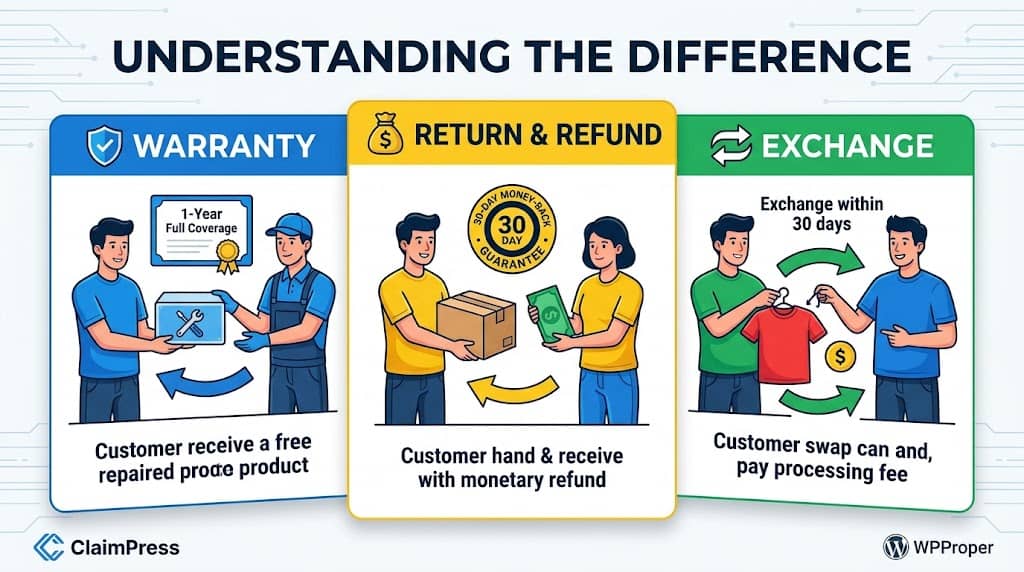
Warranty vs. Return vs. Exchange: Understanding the Difference
Before diving into plugin setups, it’s critical to understand that these three concepts — warranty, return/refund, and exchange — serve distinct purposes. Conflating them in your store leads to customer confusion and operational headaches. Here’s how to think about each one:
Warranty
A guarantee that a product will function as advertised for a specified period. Can be included (free) or paid (upsell tier). Covers manufacturing defects, not user damage.
Return & Refund
The customer sends the product back and receives a full or partial monetary refund. A money-back guarantee. May include a restocking fee deducted from the refund.
Exchange
The customer keeps their order slot but swaps the product for a different size, color, or variant. Retains the sale and reduces revenue loss. May include a processing fee.
These three are independent modules. A great rma return refund & exchange for WooCommerce plugin lets you enable any combination of these features on a per-product basis — not just a store-wide blanket policy. This granularity is essential for stores with diverse product catalogs.
WooCommerce Default Limitations for RMA
WooCommerce is a powerful e-commerce platform, but its native return and refund capabilities are extremely limited — especially for stores that want to offer a professional, automated RMA experience. Here’s what WooCommerce gives you out of the box, and where it falls painfully short:
| Feature | WooCommerce Default | With a Dedicated Plugin |
|---|---|---|
| Per-product return policies | ✗ No | ✓ Yes |
| Customer self-service claim portal | ✗ No | ✓ Yes |
| Guest claim submissions | ✗ No | ✓ Yes |
| Warranty upsell at checkout | ✗ No | ✓ Yes |
| Centralized claims dashboard | ✗ No | ✓ Yes |
| Automated restocking / exchange fees | ✗ No | ✓ Yes (Pro) |
| Admin → customer messaging | ✗ No | ✓ Yes |
WooCommerce’s built-in refund tool is manual, backend-only (invisible to customers), and offers zero warranty or exchange functionality. For any store processing more than a handful of returns per month, a dedicated return refund & exchange for WooCommerce plugin is not just helpful — it is essential.
Plugin Comparison: Top Return & Refund Plugins for WooCommerce
The WordPress plugin directory lists dozens of options claiming to handle returns and refunds. But not all are created equal. Below we break down the most popular solutions — including options marketed as a return refund and exchange for WooCommerce plugin — so you can make an informed decision.
ClaimPress – Advanced Warranty, Return, Refund & Exchange
An enterprise-grade, three-in-one claims management platform. Handles warranty, exchange, and return/refund as independent modules per product. Features a full admin dashboard, customer self-service portal, guest claim support via shortcode, bulk product setup, real-time badge notifications, and a comprehensive Pro tier for automated fees, PDF certificates, and revenue-generating paid warranty tiers.
✓ Guest Claims
✓ Paid Warranty Upsells
✓ Bulk Setup Tool
✓ HPOS Compatible
WooCommerce Return Refund and Exchange (YITH)
YITH offers a popular return refund and exchange for WooCommerce pro plugin. It covers basic RMA workflows, coupon refunds, and some exchange options. However, it lacks built-in warranty management and requires an expensive annual subscription. Its setup can be complex for beginners, and warranty certificates are not available.
✗ No Warranty Module
✗ Premium Only
WooCommerce RMA Return Refund & Exchange (WebToffee)
WebToffee’s offering is widely marketed as an rma return refund & exchange for woocommerce pro solution. It handles basic RMA flows with order-level requests. However, it does not offer per-product warranty management, paid warranty tiers, or a bulk product setup tool. Customer-facing UI is functional but dated.
✗ No Warranty Management
✗ No Paid Warranty Tiers
Flexible Refund and Return Order for WooCommerce
The flexible refund and return order for WooCommerce plugin is a lightweight, free option for very simple use cases. It allows customers to submit refund/return requests from the order view page. However, it lacks warranty management, exchange support, guest claim forms, and any advanced admin workflow features. Best for micro-stores only.
✗ No Warranty
✗ No Exchange
✗ No Guest Claims
Verdict: Why ClaimPress Wins the Comparison
When evaluated across features, value, ease of setup, and extensibility, ClaimPress is the clear winner. It is the only plugin in this category that natively handles all three claim types (warranty, return, exchange) as independent per-product modules, offers a free tier powerful enough for growing stores, and provides a Pro upgrade path for revenue-generating features — all without requiring an expensive subscription. For stores seeking a complete return for WooCommerce solution, it is unmatched.
ClaimPress Spotlight: The Best All-in-One RMA Plugin for WooCommerce
ClaimPress – Advanced Warranty, Return, Refund & Exchange for WooCommerce (by DominoPress) is not just another return plugin — it is a full-scale claims management platform built specifically for WooCommerce. Tested up to WooCommerce 10.8 and WordPress 7.0, it is HPOS-compatible, translation-ready, and designed to scale from small boutique stores to high-volume enterprise operations.
Advanced Warranty System
Create unlimited warranty plans — from simple included warranties (e.g., “1 Year Warranty”) to complex paid tiers with multiple price points.
Smart Exchange Management
Let customers effortlessly exchange products for different sizes, colors, or variants within a fully customizable period.
Flexible Return / Refund System
Build customer trust with customizable money-back guarantees on a per-product basis. Perfect for offering “30-day risk-free” policies on selected items.
Dual Claim System
Works for both logged-in customers (via “My Account > Claimable Products”) and guest customers (via the [claimpress_guest_form] shortcode).
Centralized Admin Dashboard
All claims in one place with inline status editing, filtering by type and status, real-time notification badge, and direct customer messaging.
Bulk Product Setup Tool
Instantly apply warranty, exchange, or return policies to thousands of products by category — no manual product-by-product editing required.
“Transform your WooCommerce store with ClaimPress — the premium, all-in-one solution for warranty, return, refund, and exchange management. Built by developers who understand e-commerce, ClaimPress delivers enterprise-level features with WordPress simplicity.”
What truly differentiates ClaimPress from every other return refund and exchange for WooCommerce plugin is its modular architecture. Unlike competitors that force a one-size-fits-all approach, ClaimPress lets you enable exactly the combination of features each individual product needs. A delicate handcrafted item might only need a 14-day return window. A high-value electronics product might need all three: a 1-year warranty, a 30-day exchange, and a 14-day money-back guarantee. ClaimPress handles both scenarios elegantly.
Step-by-Step: How to Set Up ClaimPress on Your WooCommerce Store
Follow this complete, beginner-friendly tutorial to go from zero to a fully operational return refund and exchange for WooCommerce system in under 30 minutes. No coding required.
Install and Activate ClaimPress
Navigate to WordPress Admin → Plugins → Add New Plugin. Search for “ClaimPress” and click Install Now, then Activate.
Alternatively, download the plugin from dominopress.com or WordPress.org, then upload it via Plugins → Add New → Upload Plugin.
After activation, go to Settings → Permalinks and click Save Changes to flush rewrite rules. This ensures the “Claimable Products” tab works correctly in My Account.
Configure Your Global Settings
Go to ClaimPress → Settings in your WordPress admin sidebar. Here you’ll configure the essential global options:
- Notification Emails: Enter the email address(es) that should receive alerts whenever a new claim is submitted. Supports multiple comma-separated emails.
- Allow Multiple Claims: Toggle whether customers can file more than one claim per product. Set a numeric limit with the “Max Claims per Item” field.
- Guest Claim Page: Select the page where you placed the
[claimpress_guest_form]shortcode (see Step 3). - Display Hook: Choose where warranty/policy information appears on the product page (before or after the Add to Cart button).
- Eligible Order Statuses: Define which order statuses count as “completed” for warranty/return eligibility — includes custom statuses from plugins like Trackship.
Add multiple email addresses to notification emails to alert both your customer service team and your operations manager simultaneously.
Set Up the Guest Claim Portal
Guest claim support is a standout feature that most competing plugins don’t offer. Here’s how to activate it:
- Go to Pages → Add New Page and create a page titled something like “File a Claim” or “Returns Portal”.
- In the page editor, add the shortcode:
[claimpress_guest_form] - Publish the page.
- Return to ClaimPress → Settings and select your new page from the Guest Claim Page dropdown. Save.
- Optionally, add this page to your site’s navigation menu via Appearance → Menus so customers can find it easily.
Guests simply enter their Order ID and Email address to access their eligible products and file claims. The system validates their credentials automatically and routes claim notifications to your admin email.
Enable ClaimPress Features on Individual Products
This is where the magic happens. Every product in your WooCommerce store gets its own ClaimPress policy configuration:
- Go to Products and edit any product.
- In the Product Data section, click the new “ClaimPress” tab.
- You’ll see three independent sections: Warranty, Exchange, and Return/Refund.
- Check “Enable”
- Choose: Included (free) or Paid
- Set duration (e.g., 12 Months)
- For Paid: add price tier(s)
- Check “Enable”
- Set exchange period (e.g., 30 Days)
- Optional: Pro fee automation
- Check “Enable”
- Set return period (e.g., 14 Days)
- Optional: restocking fee via Pro
You can enable any combination — one, two, or all three. Click Update to save. The product page will immediately display the relevant policy badges to shoppers.
Use the Bulk Setup Tool for Large Catalogs
If you have hundreds or thousands of products, setting up each one individually is impractical. ClaimPress solves this elegantly with the Bulk Setup Tool:
- Go to ClaimPress → Products.
- Use the category filter to select a product group (e.g., “Electronics” or “Apparel”).
- Configure the desired warranty, exchange, or return settings for that category.
- Click Apply to Category — ClaimPress will instantly configure all products in that category.
The Bulk Setup Tool also gives you a bird’s-eye view of your catalog, showing which products have which features active — making policy audits a breeze.
Manage Claims from the Admin Dashboard
Once your store goes live, claims will start flowing in. Here’s how to manage them efficiently:
- Go to ClaimPress → All Claims to see every claim in a sortable, filterable table.
- Filter by claim type (Warranty, Exchange, Return) or by status (Pending, In Progress, Approved, Rejected, Completed).
- Use inline status editing to update claim statuses directly from the list — no need to open each claim individually.
- Click any claim to view full details, read the customer’s description, and reply directly from the admin. Admin replies automatically advance the status to “In Progress.”
- Watch for the real-time notification badge in the WordPress sidebar — it shows the count of pending claims requiring attention.
You can also manually create claims on behalf of customers via ClaimPress → Create Claim — ideal for claims submitted by phone or email.
ClaimPress Pro: Unlock Revenue-Generating RMA Features
The free version of ClaimPress is impressive on its own. But ClaimPress Pro takes your rma return refund & exchange for WooCommerce pro setup to the next level, turning your claims department from a pure cost center into a profit-generating operation. Here are the exclusive Pro features that make it worth every penny:
The Fee Waiver System: Handling “Your Mistake” Claims Fairly
One of the most innovative Pro features is the Fee Waiver Request System. Sometimes, an exchange or return is needed because you made a mistake — shipped the wrong color, sent a DOA unit, or made an error in the order. In these cases, charging the customer a processing fee is unfair and will damage your reputation.
ClaimPress Pro’s Fee Waiver system lets customers request that the fee be waived. They must provide a reason and proof (photo/document). As the admin, you then have two options: Approve the Waiver (claim proceeds for free) or use the one-click “Decline Waiver & Send Payment Link” button to instantly email the customer a link to pay the standard fee. Zero back-and-forth. Maximum efficiency.
RMA Best Practices for WooCommerce Store Owners
Having the right return plugin for WooCommerce installed is only half the battle. How you configure your policies and manage the customer experience is equally important. Here are proven best practices from high-performing WooCommerce stores:
Make Your Policy Visible
Display your warranty and return policies directly on the product page (ClaimPress handles this automatically). Also add a summary to your header, footer, and checkout page.
Set Realistic Time Windows
Industry standards are 14–30 days for returns and 30–90 days for exchanges. Longer windows actually reduce claims (customers have less urgency). Match your window to your product category.
Respond Quickly to Claims
Aim to respond within 24 hours. ClaimPress sends instant email notifications for new claims. Use the admin reply feature to communicate directly from the dashboard without switching tools.
Use Proof Requirements to Prevent Fraud
Enable mandatory proof attachments in ClaimPress Pro settings. Requiring a photo of the defective item filters out fraudulent claims before they ever reach your inbox.
Offer Exchanges Before Refunds
Train your team to proactively offer an exchange to any customer seeking a refund. Exchanges retain the sale. With ClaimPress’s workflow, admins can suggest alternatives directly from the claim view.
Use Warranties as Upsells
Paid warranty tiers (available in ClaimPress Pro) are powerful revenue generators. A “3-Year Gold Protection Plan” at $19 has a high perceived value and near-zero marginal cost for low-defect-rate products.
💌 Customize Your Email Templates
ClaimPress includes a completely redesigned, modern HTML email template system. Go to ClaimPress → Email Templates to customize the three key emails: Admin Notification (new claim received), Customer Confirmation (claim submitted), and Customer Update (status change). Use clickable merge-tag chips like {customer_name}, {claim_type}, and {admin_message} to personalize every communication.
Frequently Asked Questions
Q. Does ClaimPress work with WooCommerce High-Performance Order Storage (HPOS)?
Yes. ClaimPress explicitly declares compatibility with WooCommerce HPOS (custom order tables), ensuring full compatibility with modern WooCommerce performance features. You can enable HPOS in WooCommerce settings without any plugin conflicts.
Q. Can guest customers (non-logged-in) file a warranty or return claim?
Absolutely. Add the [claimpress_guest_form] shortcode to any WordPress page. Guests enter their Order ID and email address to access their eligible products and submit claims. ClaimPress even supports custom sequential order numbers from plugins like WebToffee and SkyVerge via a “Fallback Lookup” mechanism.
Q. Is there a difference between the free version and ClaimPress Pro for returns?
The free version includes the complete return refund and exchange for WooCommerce workflow: per-product enable/disable, configurable return periods, customer claim submission, admin dashboard, status management, and email notifications. ClaimPress Pro adds automated restocking fees, proof attachment enforcement, fee waiver system, PDF warranty certificates, unlimited paid warranty tiers, and custom marketing labels.
Q. How do automated restocking and exchange fees work?
In ClaimPress Pro, set your default fees in Settings. When a customer files an Exchange or Return, the system automatically creates a “Processing Fee” WooCommerce order. The claim locks in “Pending Payment” status. Once the customer pays via checkout, the claim automatically advances to “Paid” status and sends you a notification. No manual invoicing needed.
Q. Does ClaimPress collect my customers’ data?
No. ClaimPress includes an optional, opt-in analytics system that only collects anonymous usage data (WordPress version, plugin version, site URL) — and only if you explicitly consent. Customer data, order details, and claim information never leave your server. You can opt out anytime without any impact on plugin functionality.
Q. Can I apply return policies to all my products at once?
Yes. Use the Bulk Setup Tool in ClaimPress → Products. Filter by product category and apply your chosen warranty, exchange, or return settings to all products in that category simultaneously. This is particularly useful for stores with large catalogs transitioning to a structured RMA system.
Final Verdict & Recommendation
Setting up a professional return refund and exchange for WooCommerce system is one of the highest-ROI investments you can make for your online store. The data is unambiguous: better return experiences drive more repeat purchases, higher customer satisfaction scores, and fewer chargebacks.
After evaluating all available options in the WordPress ecosystem, ClaimPress stands alone as the most complete, most flexible, and most value-packed solution available. It is the only return refund and exchange for WooCommerce plugin that:
Handles Warranty, Return, and Exchange as independent per-product modules
Supports both logged-in and guest customers out of the box
Offers a powerful free tier — no subscription required to get started
Compatible with WooCommerce HPOS and tested up to WooCommerce 10.8
Includes a Bulk Setup Tool for instant catalog-wide policy application
Pro tier turns RMA into a revenue-generating operation with paid warranties & automated fees
Beautiful, modern UI for both the admin dashboard and the customer-facing portal
Actively maintained with regular updates (v3.1.8 at time of writing)
Wrapping Up
In 2025 and beyond, a well-implemented return refund and exchange for WooCommerce system is not a luxury — it’s a fundamental component of a competitive, customer-centric online store. Whether you’re comparing options like the rma return refund & exchange for WooCommerce plugins from YITH and WebToffee, or evaluating lightweight solutions like the flexible refund and return order for WooCommerce, the conclusion is consistent: none match the depth, flexibility, and value that ClaimPress delivers.
From its intuitive per-product setup to its powerful bulk management tools, from its seamless guest claim portal to its enterprise-grade Pro features — ClaimPress is the definitive answer to the question: “Which is the best return refund and exchange for WooCommerce plugin?”
Install it today, configure it in under 30 minutes, and give your customers the hassle-free claims experience they deserve — and your business the operational efficiency it needs.
