

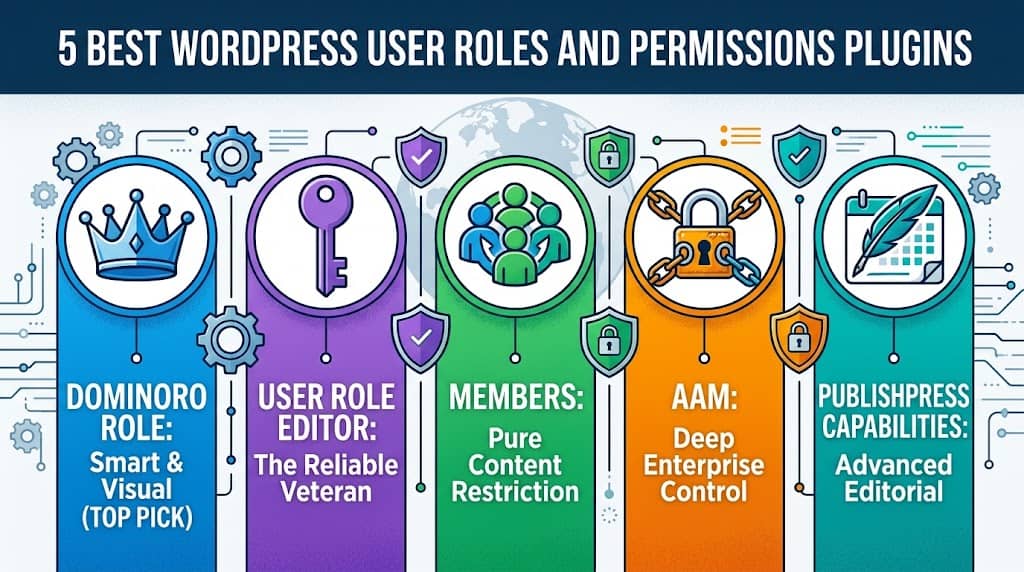
WordPress ships with five default user roles — Administrator, Editor, Author, Contributor, and Subscriber. For a personal blog, that’s more than enough. But the moment you’re running a membership site, an agency client portal, a WooCommerce store with staff, or a multi-author publication, those five roles become a straitjacket. You need finer control, and you need it without touching code.
That’s where a dedicated WordPress user roles and permissions plugin becomes essential. The right tool lets you create custom roles from scratch, modify which capabilities each role possesses, assign multiple roles to one user, and even grant temporary access that expires automatically — all from a clean admin interface. A good user capabilities WordPress plugin eliminates the guesswork, prevents privilege escalation, and keeps your site secure.
We’ve reviewed every major option in this space, from the veteran user role editor plugin solutions to the brand-new React-powered dashboards. Here are the five best — starting with our top pick.
Why WordPress User Roles & Permissions Matter
User roles and capabilities are WordPress’s built-in access control system. Every action a user can take — publishing a post, deleting a page, installing a plugin, accessing WooCommerce orders — is governed by a “capability” that either is or isn’t assigned to their role. When these assignments are too broad, users can take actions they shouldn’t. When they’re too narrow, users are blocked from doing their actual job, creating bottlenecks and support requests.
Getting this balance right is where a WordPress user roles and permissions plugin earns its keep. Real-world use cases include:
👔
🛒
✍️
🔧
What to Look for in a User Roles and Permissions Plugin
Not all user role editor plugin options are built equal. Before picking one, evaluate it against these critical criteria:
| Criteria | Why It Matters |
|---|---|
| Custom Role Creation | The ability to create roles from scratch is essential for sites with unique staffing structures. |
| Granular Capability Control | You should be able to toggle individual capabilities per role — not just assign preset permission bundles. |
| User-Level Overrides | Assign custom capabilities to individual users without changing their role for everyone else. |
| Temporary Permissions | Time-limited access that expires automatically prevents forgotten contractor accounts from becoming security holes. |
| Default Role Protection | Accidentally deleting or modifying the built-in WordPress Administrator role can lock you out of your own site. |
| Import / Export | Migrating role configurations between staging and production should be a file export, not manual recreation. |
| Third-Party Plugin Support | WooCommerce, LMS, and SEO plugins add their own capabilities — your plugin should detect and expose them. |
by DominoPress
If you’re looking for the most complete, modern, and genuinely useful WordPress user roles and permissions plugin available in 2025, DominoRole by DominoPress is the definitive answer. Built from the ground up with a React + Chakra UI frontend, it replaces WordPress’s aging user management screens with a lightning-fast, visually stunning interface that feels like a proper SaaS application — not a WordPress plugin bolted onto an admin page.
What sets DominoRole apart from every other user role editor WordPress plugin on this list is its unique combination of depth and usability. It doesn’t just let you toggle capabilities on and off — it explains what each capability does, shows you which admin menus it unlocks, auto-detects new capabilities added by third-party plugins, and lets you grant time-limited permissions that expire automatically. At version 2.0.1, this is the most sophisticated approach to WordPress access control we’ve seen.
Core Features — DominoRole
user_has_cap filter — permissions are injected at runtime and never permanently stored. Status tracking: Active, Expired, Revoked.⚡ One-Click Preset Roles — What’s Included
DominoRole hooks into WooCommerce’s woocommerce_prevent_admin_access and woocommerce_login_redirect filters, applying a Smart Login Redirect that routes admin-capable users to wp-admin and regular customers to the WooCommerce account page — automatically, with no additional configuration. WooCommerce capabilities (manage_woocommerce, view_admin_dashboard, etc.) are fully supported in the Permission Manager’s grouped capability view.
- Modern React UI — fastest in class
- Dynamic Menu Access Viewer (unique feature)
- Temporary permissions via
user_has_capfilter — no DB bloat - Smart Capability Detector for third-party plugins
- 7 one-click preset role templates
- Default WP roles fully protected
- Import/export for role migration
- WooCommerce-aware from the ground up
- Newer plugin (v2.0.1) — still building review count
- Some advanced features gated behind Pro
- Requires
dominorole_managecapability for access
WooCommerce Stores
Membership Sites
Multi-Author Blogs
LMS Platforms
Security-Conscious Admins
User Role Editor by Vladimir Garagulya
Free + Pro · ~$29/yr
The original user role editor plugin — and for many years, the go-to solution. Vladimir Garagulya’s plugin has been downloaded millions of times and remains the most installed option in this category. It provides solid capability management with a clean tabbed interface, role cloning, and per-user capability overrides. It introduced the concept of the user role editor WordPress plugin to most WordPress developers.
However, the interface shows its age against modern alternatives. There’s no dynamic menu access viewer, no smart capability detector, no one-click preset roles, and the temporary permissions feature requires the Pro upgrade. For new installations in 2025, it faces stiff competition from more modern tools.
✓ Per-user capability overrides
✓ Multi-site support
✗ Dated interface
✗ No menu access viewer
✗ No smart capability detection
✗ No preset role templates
Members by MemberPress
Free
Members is a well-regarded, entirely free WordPress user roles and permissions plugin from the MemberPress team. It focuses heavily on content restriction — controlling which roles can view specific posts, pages, or custom post types. Its role management is solid for basic to intermediate needs, and the content restriction features are unmatched at the free tier.
Where it falls short is in advanced user management: no temporary permissions, no smart capability detection, no preset roles, and no dynamic menu access viewer. It’s also less suited to WooCommerce-heavy environments. As a pure user capabilities WordPress plugin focused on content restriction, it’s excellent — as a complete role management suite, it’s limited.
✓ Excellent content restriction
✓ Multiple roles per user
✗ No temporary permissions
✗ No capability presets
✗ No smart detection
✗ Limited WooCommerce support
Advanced Access Manager (AAM)
Free + Premium
Advanced Access Manager is arguably the most feature-dense WordPress user roles and permissions plugin in existence — it can control access to nearly every conceivable part of a WordPress site: posts, pages, media, menus, admin menus, REST API endpoints, login redirects, and more. If you need enterprise-grade access control for a complex multi-role environment, AAM has settings for it.
The downside is that all this power comes with a steep learning curve. The interface is dense, the settings are fragmented across many panels, and understanding what each option does requires significant research. For most WordPress sites, AAM is overkill — and its complexity introduces a higher risk of misconfiguration that can accidentally lock administrators out.
✓ REST API access control
✓ Admin menu restriction
✗ Very steep learning curve
✗ Complex, fragmented UI
✗ Easy to misconfigure
✗ No preset role templates
PublishPress Capabilities
Free + Pro · ~$119/yr
PublishPress Capabilities is the successor to the well-known Role Scoper plugin and is part of the broader PublishPress editorial workflow suite. As a user role editor plugin, it excels at managing content-related permissions — controlling who can edit, delete, or publish specific post types. It also integrates tightly with Gutenberg and the PublishPress editorial calendar.
Like Members, it’s oriented toward editorial workflows rather than comprehensive user access management. The Pro version adds block editor permissions and front-end capability control, but the price tag is high for the feature set, and it lacks the temporary permissions, smart detection, and modern UI that DominoRole provides.
✓ Gutenberg block permissions (Pro)
✓ Good post-type control
✗ Expensive Pro tier
✗ No temporary permissions
✗ No smart capability detector
✗ Limited WooCommerce support
Side-by-Side Feature Comparison
Here’s how all five WordPress user roles and permissions plugin options stack up across the key features that matter most:
| Feature | DominoRole | URE | Members | AAM | PublishPress |
|---|---|---|---|---|---|
| Create Custom Roles | ✓ | ✓ | ✓ | ✓ | ✓ |
| Temporary Permissions | ✓ Free | ✓ Pro | ✗ | ✗ | ✗ |
| Smart Cap. Detector | ✓ | ✗ | ✗ | ✗ | ✗ |
| Menu Access Viewer | ✓ | ✗ | ✗ | ~ | ✗ |
| One-Click Presets | ✓ 7 Roles | ✗ | ✗ | ✗ | ✗ |
| Multiple Roles / User | ✓ | ✓ Pro | ✓ | ✓ | ✗ |
| Import / Export | ✓ JSON | ✓ | ✗ | ✗ | ✗ |
| Default Role Protection | ✓ Strict | ~ | ~ | ~ | ~ |
| Modern UI | ✓ React | ✗ | ~ | ✗ | ~ |
✓ = Supported | ✗ = Not Supported | ~ = Partial / Basic
Frequently Asked Questions
Q. What’s the difference between a WordPress role and a capability?
A role is a named label (e.g., “Editor” or “Shop Manager”) that groups a set of capabilities together. A capability is a specific permission (e.g., edit_posts, manage_woocommerce, upload_files). When you assign a role to a user, they inherit all the capabilities defined for that role. A user capabilities WordPress plugin lets you modify both roles and the individual capabilities they contain.
Q. Can a WordPress user have multiple roles at the same time?
Yes, with the right plugin. WordPress technically supports multiple roles per user, but the default admin interface only assigns one. DominoRole’s User Manager lets you assign multiple roles simultaneously — so a user can be both a “Content Writer” and a “Shop Manager” at the same time, inheriting the combined capabilities of both roles.
Q. Is it safe to modify the default WordPress Administrator role?
No — and DominoRole actively prevents it. Modifying, resetting, deleting, or cloning the default WordPress roles (Administrator, Editor, Author, Contributor, Subscriber) can lock you out of your own site or cause unexpected behavior. DominoRole strictly protects these roles in its REST API permission checks, making it the safest choice for a wordpress user roles and permissions plugin.
Q. How do temporary permissions work in DominoRole?
DominoRole’s temporary permissions use WordPress’s user_has_cap filter to inject a capability at runtime for a specific user — without ever permanently writing it to the database. When the expiry date/time passes, the admin_init hook triggers the expire_permissions() method, which removes the entry from the temporary permissions table. The user’s original roles are completely untouched.
Q. Will a user role editor plugin work with WooCommerce?
Yes — DominoRole is specifically built with WooCommerce in mind. Its Permission Manager groups WooCommerce capabilities (like manage_woocommerce, view_woocommerce_reports) in a dedicated WooCommerce section. It also hooks into WooCommerce’s login redirect and admin access filters, ensuring custom roles with appropriate WooCommerce caps are treated correctly by both WordPress and WooCommerce simultaneously.
Q. Can I migrate my roles from one WordPress site to another?
Yes, with DominoRole’s Import/Export feature. Navigate to DominoRole → Import / Export, export your current role configuration to a JSON file, then import that file on any other WordPress site running DominoRole. This makes migrating between staging and production environments — or deploying a standard role configuration across multiple client sites — a matter of seconds.
Our Final Verdict
Every plugin on this list has its strengths, and the best WordPress user roles and permissions plugin for you depends on your specific needs. But when evaluated across the full feature set — modern UI, temporary permissions, smart capability detection, preset roles, default role protection, WooCommerce integration, and import/export — DominoRole stands head and shoulders above the competition.
It’s the only user role editor WordPress plugin that shows you exactly which admin menus a capability unlocks before you save, that auto-detects new capabilities from third-party plugins the moment they’re installed, and that grants time-limited permissions using a runtime filter so the user’s permanent role is never modified. These aren’t marketing claims — they’re directly observable in the plugin’s source code.
If you use User Role Editor and it’s working for you, stick with it. If you need content restriction on a budget, Members is excellent. But if you’re starting fresh, or if you’ve outgrown your current setup and need a user capabilities WordPress plugin that genuinely thinks of everything — DominoRole is the clear choice.
Wrapping Up
Choosing the right WordPress user roles and permissions plugin is a security decision as much as a convenience one. Too many permissions and your site is vulnerable; too few and your team can’t do their jobs. The tools reviewed in this guide represent the full spectrum — from the battle-tested User Role Editor to the category-leading DominoRole.
For most WordPress sites — especially those running WooCommerce, multiple author workflows, or client access portals — DominoRole delivers the best combination of safety, power, and ease of use. Its unique features like the Dynamic Menu Access Viewer, Smart Capability Detector, and runtime-based Temporary Permissions set a new standard for what a user role editor plugin can be.
Install it today, create your first custom role with a one-click preset, and experience the difference that a truly modern user capabilities WordPress plugin makes on your site’s security and operational efficiency.
