

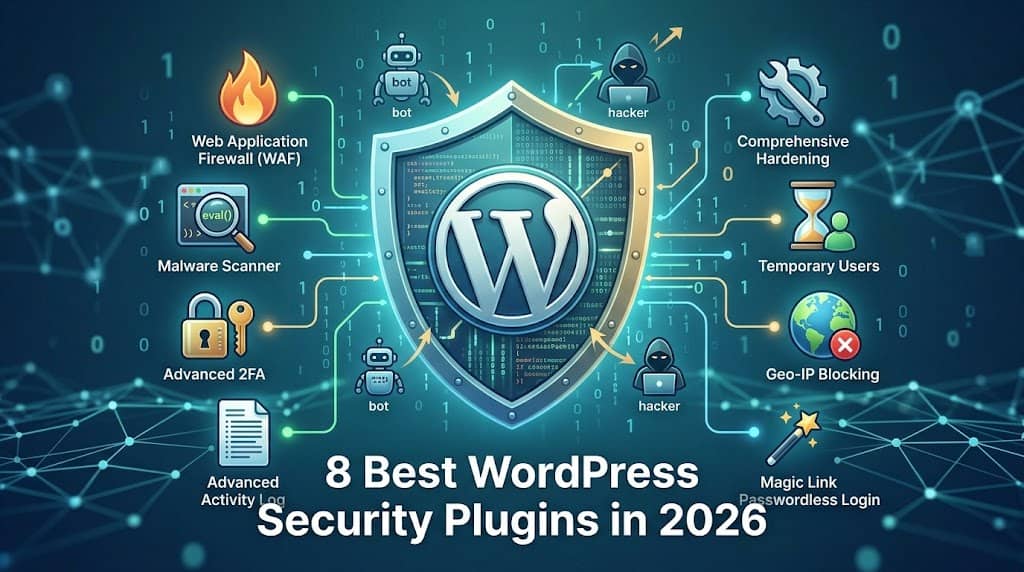
WordPress powers more than 43% of all websites on the internet — and that popularity makes it the number-one target for hackers, bots, and automated vulnerability scanners. Whether you run a personal blog, a WooCommerce store, or a corporate website, having the best security plugin for WordPress installed is not optional. It’s a survival requirement.
In this in-depth guide, we’ve tested and compared the most capable WordPress security plugins available in 2026 — covering their firewall strength, malware detection, login protection, ease of use, performance impact, and pricing. By the end, you’ll know exactly which plugin is the right fit for your site.
🔒
Quick Tip
No security plugin works in isolation. Combine a good plugin with strong passwords, regular updates, and a reputable hosting provider for the best protection.
Top WordPress Security Plugins Compared in 2026
We evaluated each wp security plugin across seven core criteria: firewall quality, malware scanning, brute-force protection, login security, site hardening, performance footprint, and real-world usability. Here’s what we found.
1. DominoGuard Security
by DominoPress | Free + Pro | Version 2.0.0
Malware Scanner
2FA
Activity Log
Hide Login
Our Rating
9.7/10
★★★★★
If you’ve been searching for the best security plugin for WordPress that delivers enterprise-grade protection without the usual bloat and complexity, your search ends with DominoGuard Security. This modern, ultra-lightweight plugin packs a staggering feature set into a beautifully designed, decoupled React.js dashboard that feels nothing like the clunky admin panels you’re used to.
What makes DominoGuard stand apart from every other WordPress security plugin on this list is its philosophy: zero frontend assets. Most security plugins secretly inject CSS and JavaScript files onto your public-facing pages, slowing down your site for every visitor. DominoGuard loads absolutely nothing on the frontend — your PageSpeed score stays pristine.
Key Features:
🔥 Web Application Firewall (WAF)
Blocks SQL injection, XSS, and directory traversal attacks before they reach your database. Features smart rate limiting, 404 lockout for bot scanners, Geo-IP blocking by country, and a permanent IP blocklist.
🔐 Advanced 2FA & Magic Links
Supports TOTP (Google Authenticator / Authy), Email 2FA, and a revolutionary Magic Link login — a passwordless entry system that sends a cryptographically secure, one-time link to your email.
🦠 Triple-Layer Malware Scanner
Core File Verification checks WordPress core against official checksums. The Malware Signature Scanner hunts backdoors and eval() injections in wp-content. File Integrity Monitoring (FIM) alerts you the moment any file is secretly changed.
📋 Advanced Activity Log
An audit trail that tracks post deletions, plugin activations, settings changes, and theme switches — complete with IP address, user ID, and timestamp. Auto-purge rules keep your database lean.
🛡️ Comprehensive Hardening
Disable XML-RPC, block PHP execution in uploads, enforce HTTP security headers, hide WordPress version, disable the file editor, block user enumeration, and disable the REST API users endpoint.
👤 Temporary Users & Session Manager
Generate self-deleting temporary accounts for developers or support agents. The Active Sessions Manager gives you a real-time view of every logged-in user with one-click remote session termination.
✅ Pros
- Zero frontend performance impact
- Beautiful, fast React.js dashboard
- Magic Link passwordless login (unique)
- Triple-layer malware scanning
- Geo-IP blocking included free
- Thoughtful, noise-free activity log
- Brute force + smart rate limiting
⚠️ Cons
- TOTP 2FA requires Pro plan
- CSV export is Pro-only
- Newer plugin (less community posts)
- Remote session termination is Pro
💰 Pricing
Free core plugin | Pro plans available
2. Wordfence Security
by Defiant Inc | Free + Premium ($119/yr) | 5M+ Active Installs
Malware Scanner
Live Traffic
2FA
Our Rating
9.1/10
★★★★★
Wordfence is the most installed best wordpress security plugins free option in the world, and for good reason. It combines a powerful endpoint firewall with one of the most comprehensive malware scanners available. Its Threat Intelligence Feed is updated in real time, and the free version gives you access to rules that are only 30 days old (Premium gets them instantly).
However, Wordfence has a well-documented reputation for being a resource hog. The malware scanner runs on your server, consuming significant CPU and memory. On shared hosting, this can temporarily slow down your site during scans. It also stores voluminous log data in your WordPress database, which can balloon in size over time. For high-traffic sites on robust servers, this is a minor concern — but for smaller sites, it’s worth noting.
✅ Pros
- Massive threat intelligence database
- Excellent live traffic monitoring
- Country blocking (Premium)
- Strong community support
- Reliable brute force protection
⚠️ Cons
- Heavy on server resources
- Database bloat from excessive logs
- Free firewall rules are 30 days delayed
- Dashboard can feel overwhelming
Best for: Developers and technical users on managed or dedicated hosting who want the most exhaustive scanning capability and don’t mind the resource overhead.
3. Solid Security (Formerly iThemes Security)
by StellarWP | Free + Pro ($99/yr) | 900K+ Active Installs
Our Rating
8.7/10
★★★★☆
Formerly known as iThemes Security, Solid Security rebranded and modernised its interface significantly. It excels at site hardening and login protection. The free version gives you over 30 ways to secure your site, including brute force protection, file change detection, and 2FA. The Pro version adds a vulnerability scanner that checks all your installed plugins against a known CVE database — a genuinely useful feature for site managers who want passive threat monitoring.
One notable drawback: Solid Security lacks a true application-level Web Application Firewall (WAF). It relies on server-level rules and doesn’t block malicious traffic before it hits WordPress. For sites in higher-risk environments, combining it with a CDN-based WAF like Cloudflare is recommended.
Best for: Small-to-medium sites that want a guided, wizard-driven setup experience with strong hardening defaults and passive vulnerability detection.
4. All-In-One Security (AIOS)
by Team Updraft | Free + Premium ($70/yr) | 1M+ Active Installs
Our Rating
8.2/10
★★★★☆
All-In-One Security (AIOS) is one of the most generous best security wordpress plugin options in terms of what’s available completely for free. The plugin uses a visual “Security Strength Meter” and a points-based system to gamify the hardening process, making it particularly beginner-friendly. Features like login lockdown, content protection, .htaccess-based firewall rules, and spam comment filtering are all available at zero cost.
The limitation is that AIOS relies heavily on .htaccess rules for its firewall, which only works on Apache-based servers. Users on Nginx hosting need to configure server blocks manually, which can be a showstopper for non-technical users.
Best for: Beginners on shared (Apache) hosting who want a comprehensive free security solution with a user-friendly onboarding experience.
5. Sucuri Security
by Sucuri (GoDaddy) | Free + Paid ($229.99/yr) | 800K+ Active Installs
Our Rating
8.5/10
★★★★☆
Sucuri is a premium cloud-based security platform known for its industry-leading Website Application Firewall (WAF) that operates at the DNS/CDN level — meaning malicious traffic is blocked before it even reaches your server. This is fundamentally different from endpoint plugins like Wordfence. The free WordPress plugin provides solid activity auditing and security hardening, but the real value is the paid platform that includes malware removal guarantees and DDoS protection.
The free plugin alone is quite limited compared to others on this list — you won’t get a real-time WAF or malware scanner without paying. At $229.99/year for the entry plan, it’s the most expensive option here, and pricing can feel steep for smaller sites.
Best for: E-commerce stores and high-value business sites that need a DNS-level WAF, professional malware removal guarantees, and are willing to invest in enterprise-grade protection.
6. MalCare Security
by BlogVault | Free + Pro ($149/yr) | 400K+ Active Installs
Our Rating
8.3/10
★★★★☆
MalCare’s headline feature is its off-server malware scanning. Instead of running resource-heavy scans on your web server like Wordfence, MalCare copies your site data to its own cloud servers and performs the analysis there. This means scans have zero impact on your site’s performance or uptime. Its proprietary 100+ signal detection algorithm catches new, unknown malware that signature-only scanners miss.
The major catch: MalCare’s one-click malware removal is locked behind the paid plan, starting at $149/year. The free version will detect malware but force you to upgrade to remove it — a frustrating experience if you’re already infected. It’s also worth noting that this wp security plugin is tightly integrated with the BlogVault ecosystem, so it works best as part of that broader managed backup/security platform.
Best for: Sites where performance is paramount and server resources are limited — the off-site scanning model is genuinely innovative and site-load-friendly.
7. Jetpack Security
by Automattic | Free core + Security $19.95/mo | 5M+ Active Installs
Our Rating
7.8/10
★★★★☆
Jetpack Security is the official security-focused bundle from Automattic, the company behind WordPress.com. It uniquely bundles security with performance features (CDN, lazy loading) and marketing tools, making it appealing to site owners who want to consolidate plugins. Its brute force protection and downtime monitoring work beautifully on the free tier. The real-time backups and malware scanning are genuinely excellent, powered by Automattic’s infrastructure.
The major drawback is that Jetpack is an extremely large, monolithic plugin that adds significant overhead. Its security features require a WordPress.com account and constant cloud connectivity. For users who just want a focused best wp security plugin without the bundled extras, Jetpack can feel like overkill.
Best for: WordPress.com or Jetpack ecosystem users who want an all-in-one solution for performance, backups, and security from a single trusted vendor.
8. Shield Security
by Shield Security | Free + ShieldPRO ($12/mo) | 80K+ Active Installs
Our Rating
7.9/10
★★★★☆
Shield Security differentiates itself with a strong focus on “silentModeâ„¢” protection — blocking threats without showing users captchas or lock screens. Its ShieldPRO plan includes a solid AI-powered traffic analysis engine that learns from your site’s traffic patterns to identify and block bots with high precision. The free version includes a good firewall, login protection, and two-factor authentication that surpasses what many other free tiers offer.
Shield’s smaller user base means less community documentation compared to giants like Wordfence. Its interface, while functional, can feel dated compared to modern React-based dashboards.
Best for: Technical users who want intelligent bot detection and don’t want to annoy legitimate visitors with CAPTCHA challenges.
📊 Feature Comparison Table
Use this at-a-glance reference to compare all eight best wordpress security plugins side by side across the features that matter most.
| Plugin | WAF | Malware Scan | 2FA | Activity Log | Hardening | Geo Blocking | Free Tier | Perf. Impact | Rating |
|---|---|---|---|---|---|---|---|---|---|
| ⭐ DominoGuard | ✔ Endpoint | ✔ Triple | ✔ TOTP+Email | ✔ Deep | ✔ 10+ Rules | ✔ Free | ✔ Yes | Zero | 9.7/10 |
| Wordfence | ✔ Endpoint | ✔ Deep | ✔ TOTP | ✔ Yes | ✔ Yes | ⚠ Premium | ✔ Yes | High | 9.1/10 |
| Solid Security | ⚠ Partial | ⚠ Basic | ✔ Yes | ✔ Yes | ✔ Yes | ✖ No | ✔ Yes | Medium | 8.7/10 |
| AIOS | ⚠ .htaccess | ✖ Limited | ✔ Yes | ✔ Yes | ✔ Yes | ⚠ Premium | ✔ Generous | Low | 8.2/10 |
| Sucuri | ✔ DNS/CDN | ✔ Cloud | ✖ No | ✔ Yes | ✔ Yes | ✔ Yes | ⚠ Limited | Very Low | 8.5/10 |
| MalCare | ⚠ Basic | ✔ Off-Server | ✖ No | ✔ Yes | ⚠ Basic | ✖ No | ⚠ Detect only | Very Low | 8.3/10 |
| Jetpack | ⚠ Basic | ⚠ Premium | ✖ No | ✔ Yes | ⚠ Partial | ✖ No | ⚠ Limited | High | 7.8/10 |
| Shield Security | ✔ Endpoint | ⚠ Basic | ✔ Yes | ✔ Yes | ✔ Yes | ⚠ Premium | ✔ Yes | Low | 7.9/10 |
🎯 How to Choose the Right WordPress Security Plugin
With so many capable options available, choosing the best wordpress plugin for security comes down to your specific situation. Here’s a framework to help you decide:
🏠
Personal Blog / Small Site
You need solid protection but don’t have a big budget or technical expertise. Resource efficiency matters on shared hosting.
→ DominoGuard (free, zero performance impact) or AIOS (beginner-friendly)
🛒
WooCommerce / E-Commerce Store
Payment data and customer PII mean you need serious threat protection. Malware removal guarantees and 2FA are non-negotiable.
→ DominoGuard Pro (comprehensive, zero frontend load) or Sucuri (DNS-level WAF)
🏢
Agency / Multi-Site Manager
You manage many sites and need centralized oversight. Temporary user accounts, activity logs, and CSV exports are high priorities.
→ DominoGuard Pro (temporary users, RBAC, CSV exports) or MalCare
⚙️
Developer / Technical User
You want fine-grained control, detailed logs, and access to raw threat data. You’re comfortable configuring security rules manually.
→ Wordfence (best scanner depth) or Shield (smart bot detection)
Key Questions to Ask Before Choosing:
- What is your hosting environment? Shared hosting demands a lightweight, low-resource plugin like DominoGuard or AIOS.
- Do you need malware removal? If yes, look at MalCare Pro or Sucuri’s paid platform.
- Is 2FA required? DominoGuard (Email 2FA free, TOTP Pro), Wordfence, Solid Security, and Shield all offer robust options.
- How important is a clean audit trail? DominoGuard’s Activity Log and Wordfence’s Live Traffic are both strong but serve different philosophies.
- Do you have a budget? For a genuinely capable free tier, DominoGuard, Wordfence, and AIOS lead the pack.
- What is your technical comfort level? DominoGuard’s React dashboard and AIOS are the most beginner-friendly; Wordfence and Shield reward technical investment.
🛡️ Essential WordPress Security Best Practices
Even the best wp security plugin cannot fully protect a carelessly maintained site. Security is a layered discipline. Here are the non-negotiable best practices every WordPress site owner must implement alongside their chosen plugin.
Keep Everything Updated — Always
The majority of WordPress hacks exploit known vulnerabilities in outdated plugins, themes, and the WordPress core itself. Enable automatic updates for minor core versions, and review and apply plugin updates at least weekly. A plugin abandoned by its developer for 6+ months is a security liability — deactivate and replace it.
Enable Two-Factor Authentication (2FA) for All Admin Accounts
Stolen or guessed passwords are the most common entry point for attackers. Two-factor authentication renders a compromised password useless without the second factor. Use a plugin that supports TOTP (Time-based One-Time Passwords) via Google Authenticator or Authy for the strongest protection. DominoGuard’s Magic Link system goes even further — eliminating the password entirely for admin logins.
Hide or Change Your Login URL
Every WordPress installation worldwide uses /wp-login.php by default. Automated bots know this and constantly attempt brute-force attacks against it. Changing your login URL to a private, secret slug (a feature included in DominoGuard’s Stealth module) immediately eliminates a massive category of automated attacks with zero ongoing effort.
Implement the Principle of Least Privilege
Every user account on your WordPress site should have only the minimum permissions required to do their job. Give authors the Author role, not Administrator. When granting temporary access to a developer or support agent, use a plugin like DominoGuard to generate a temporary user account that auto-deletes after a set time — never share your admin credentials.
Run Regular Backups — Offsite
No security plugin can guarantee 100% protection. If a zero-day exploit compromises your site before a patch is available, your last line of defence is a clean backup. Use a dedicated backup plugin (UpdraftPlus, BlogVault) to store backups offsite — on Amazon S3, Google Drive, or Dropbox. Never store backups only on your web server, as a hacker who compromises your server can delete them.
Use HTTPS & Enforce HTTP Security Headers
Ensure your site runs on HTTPS with a valid SSL certificate — your hosting provider likely offers free Let’s Encrypt certificates. Beyond HTTPS, enforce critical HTTP security headers: Strict-Transport-Security (HSTS), X-Frame-Options, X-Content-Type-Options, and a Content-Security-Policy. DominoGuard’s hardening module applies these automatically with a single toggle.
Disable Features You Don’t Use
XML-RPC, the REST API users endpoint, the WordPress file editor, and Application Passwords are all legitimate WordPress features that are also common attack vectors. If you don’t use XML-RPC for mobile apps or third-party integrations, disable it. If you don’t need remote password-based API access, disable Application Passwords. Every disabled attack surface is one less vulnerability an attacker can exploit. Your security plugin should make these toggles easy — as DominoGuard does through its hardening panel.
