

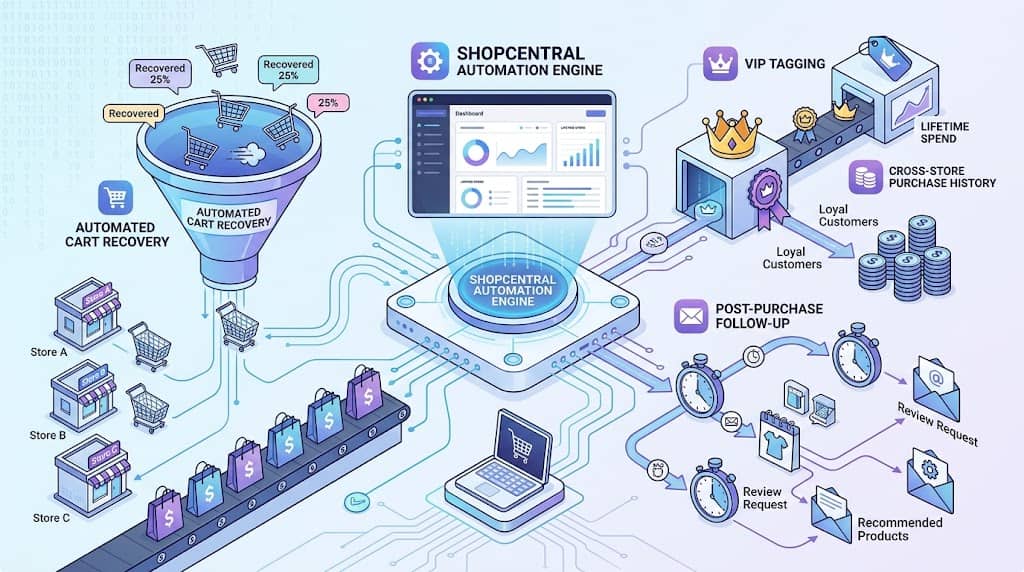
Marketing automation — the practice of triggering targeted customer communications and workflows based on specific customer behaviors — is one of the highest-ROI investments in modern eCommerce. Cart abandonment sequences recover lost revenue, post-purchase follow-ups drive repeat purchases and reviews, and VIP customer tagging enables personalized high-value customer treatment. In a single-store context, dedicated email marketing tools (Klaviyo, MailChimp, ActiveCampaign) handle these workflows. In a multi-store context, coordinating automated workflows across multiple stores from separate tool configurations multiplies complexity.
ShopCentral’s Advanced Automation Engine — a Pro feature of this multi store plugin for WooCommerce — provides a centralized automation workflow builder that operates across the entire connected store network, enabling complex multi-store automation rules without configuring separate integrations on each individual site. This article covers all automation capabilities in ShopCentral.
Why Automation Matters for Multi-Store WooCommerce Networks
The economics of automation in eCommerce are well-established:
- Cart abandonment recovery: On average, 70%+ of shopping carts are abandoned before checkout. A well-timed follow-up sequence with a discount incentive recovers a measurable portion of these — pure additional revenue from existing traffic
- Post-purchase reviews: Products with more reviews convert better. An automated post-purchase review request sequence increases review volume with no ongoing effort
- Repeat purchase triggers: A follow-up offering related products or a loyalty discount 30 days after a first purchase has a higher conversion rate than cold acquisition campaigns
- VIP treatment: Customers identified as high-value who receive personalized VIP treatment have higher retention rates than those treated identically to one-time buyers
Without a centralized automation tool in a multi store WooCommerce network, these workflows must be configured separately on each store — multiplying setup time and ongoing maintenance. ShopCentral’s Automation Engine manages these workflows from one central location, with rules that can apply across all connected stores.
ShopCentral’s Advanced Automation Engine
The Automation Engine (powered by ShopCentral_Automation_Engine) is a rule-based automation system accessible from ShopCentral → Automation. The engine allows creating automation rules that define:
- Trigger: What customer event or condition activates the automation (cart abandoned, order placed, customer reaches spend threshold)
- Conditions: Additional filters that qualify when the trigger applies (minimum order value, specific product purchased, customer tag, time delay)
- Action: What happens when the trigger fires with conditions met (send email, apply VIP tag, issue coupon, add to segment)
- Store scope: Which connected stores the rule applies to (all stores, specific stores)
This rule-based architecture makes the Automation Engine flexible enough to handle diverse automation scenarios specific to the multi-store business model — from simple single-trigger rules to complex multi-condition workflows coordinated across the store network.
Pro Feature Note: The Advanced Automation Engine is a Pro-tier feature of ShopCentral. Free version users can view the Automation section but automation rule creation and activation require a Pro plan. This aligns with ShopCentral’s Pro tier being designed for serious growth-stage multi-store operators rather than single-store businesses.
Automation Rule Types
ShopCentral’s Automation Engine supports the following categories of automation rules for woocommerce multi store manager users:
🚥 Cart Abandonment
Trigger: Customer adds to cart but does not complete checkout within defined time window. Action: Send follow-up communication with optional discount incentive to recover the sale.
🛍 Post-Purchase Follow-Up
Trigger: Order status changes to Completed. Action: Send review request, related product recommendation, or loyalty offer after a configured time delay.
⭐ VIP Tagging
Trigger: Customer lifetime spend exceeds threshold (e.g., $500 total). Action: Apply VIP customer tag, enabling segment-specific marketing and loyalty treatment across all stores.
🕑 Time-Based Rules
Trigger: Time elapsed since a customer action (last purchase, registration, coupon use). Action: Re-engagement campaign, win-back offer, or segment migration for lapsed customers.
Cart Abandonment Workflows
Cart abandonment is the single highest-value automation use case for eCommerce — representing lost revenue from customers who demonstrated purchase intent but did not complete the transaction. ShopCentral’s cart abandonment rules allow configuring:
- Abandonment window: Time after cart creation without checkout completion before the abandonment trigger fires
- Eligibility conditions: Minimum cart value, specific products in cart, or customer segment
- Follow-up action: Automated communication (email notification, coupon issuance) triggered by the abandonment event
- Store scope: Apply the cart abandonment rule to all connected stores or specific stores with different abandonment rates or margins that warrant different incentives
The key multi-store advantage: a single ShopCentral cart abandonment rule covers all connected stores, rather than requiring separate plugin installations or email tool integrations on each store independently.
Post-Purchase Follow-Ups
Post-purchase automations fire after an order is completed, targeting customers who have just demonstrated active buying behavior — the highest-intent segment for repeat purchases. Common post-purchase automation rules in ShopCentral:
- Review request (7 days post-delivery): Trigger a review request after a delivery confirmation delay — when the customer has had time to use the product and form an opinion
- Related product upsell (14 days post-purchase): Recommend complementary products from any connected store based on the item purchased
- Repeat purchase incentive (30 days post-purchase): Issue a loyalty discount coupon if the customer hasn’t purchased again within 30 days — re-engaging before the customer relationship cools
- Onboarding sequence for first-time buyers: Trigger a brand welcome sequence for customers making their first ever purchase in the store network
VIP Customer Tagging Automation
VIP tagging automation creates a dynamic customer segmentation system that automatically promotes customers into a VIP tier when they reach defined value thresholds — without requiring manual review of customer spend data. Configuration options:
- Spend threshold: Automatically tag customers who exceed a defined lifetime spend (e.g., $1,000 total orders) as VIP
- Order count threshold: Tag customers who have placed more than a defined number of orders (e.g., 5+ orders) as loyal/repeat buyers
- Cross-store scope: VIP status can be evaluated across all connected stores — a customer who splits purchases between stores still gets promoted to VIP when their combined spend crosses the threshold
- Follow-up action: Trigger a VIP welcome communication (exclusive offer, early access notification, personal thank-you) when the VIP tag is applied
VIP tagging integrates with ShopCentral’s Customer Intelligence module — tagged VIP customers are identifiable in the customer view for targeted Global Coupon Broadcasting and manual outreach.
Frequently Asked Questions
Does ShopCentral replace dedicated email marketing tools for automation?
ShopCentral’s Automation Engine handles automation triggering and rule logic from a centralized multi-store perspective. It is designed to coordinate automation across stores rather than to replace dedicated email delivery platforms like Klaviyo or MailChimp. For businesses that need complex email sequences, dynamic content personalization, or advanced email analytics, ShopCentral’s automation is best used in conjunction with a dedicated email tool — ShopCentral handles the cross-store trigger logic while the email tool handles delivery and personalization.
Are automation rules active on child stores or on the hub site only?
ShopCentral’s automation rules are configured on the hub site and coordinated through ShopCentral’s centralized API. The specific execution model depends on the rule type — some rules leverage webhooks from child stores to trigger actions on the hub, while others operate on data fetched from child stores via the REST API. The configuration and management always happens from the hub’s ShopCentral dashboard.
Automate Your WooCommerce Multi-Store Marketing
ShopCentral’s Automation Engine manages cart recovery, post-purchase flows, and VIP tagging across your entire store network from one dashboard.
