

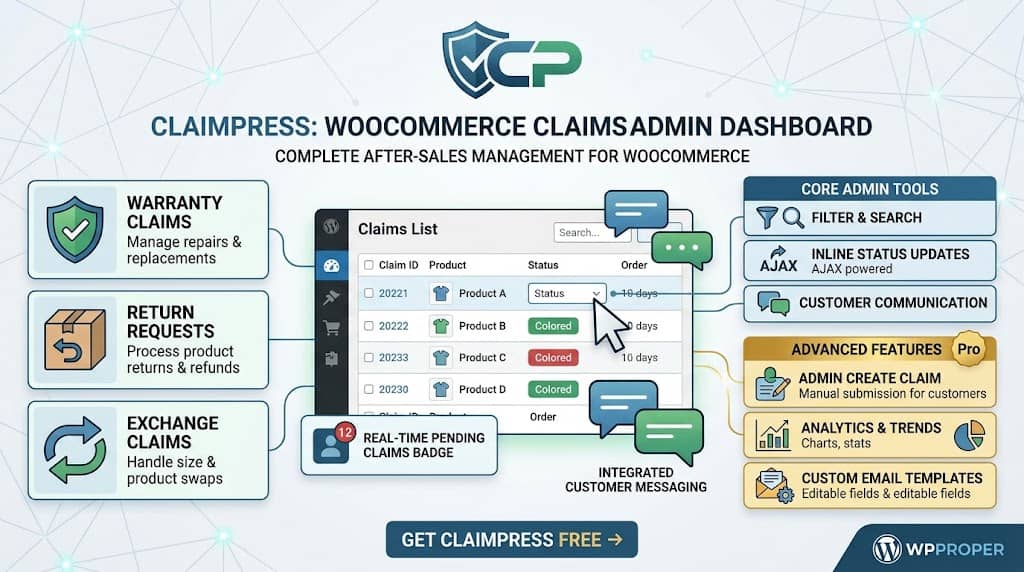
A claims management system is only as good as its admin interface. A plugin that makes claim submission easy for customers but gives admins a disorganized, inefficient dashboard to work from just moves the chaos from customer emails to an admin screen. The goal of after-sales management is to resolve claims efficiently — updating statuses, communicating with customers, and tracking resolution — not just to collect them.
ClaimPress’s Admin Claims Dashboard is a purpose-built claims management interface that gives store managers complete control over every claim in their return and warranty management system for WooCommerce. From filtering by type and status to inline status editing, customer messaging, and email notifications, the admin dashboard provides every tool needed to manage a professional after-sales operation without leaving WordPress.
Admin Dashboard Overview
ClaimPress adds a dedicated ClaimPress menu item to the WordPress admin sidebar with the following sub-sections:
- All Claims: The primary claim management screen — list of all claims with filtering, inline status editing, and quick actions
- Create Claim: Manually create claims on behalf of customers from the admin side
- Products: Bird’s-eye view of all products with ClaimPress features active — filterable by Warranty, Exchange, or Return
- Bulk Setup: Apply warranty, exchange, or return policies to entire product categories simultaneously
- Analytics: Claims statistics and trends dashboard
- Settings: Plugin configuration — notification emails, guest claim page, claim limits, proof requirements
- Advanced Features: Pro feature showcase with direct tool links (highlighted in amber/gold for visibility)
Claims List Table & Filtering
The All Claims screen displays all submitted claims in a sortable table. Each row shows:
- Claim ID and submission date
- Customer name and email
- Product name and order number
- Claim type (Warranty / Exchange / Return)
- Current status (with color-coded indicator)
- Inline status update dropdown for immediate status changes without opening the full claim view
Filtering capabilities: The claims list supports multiple filtering methods to manage high claim volumes:
- Status tabs: Filter by Pending, In Progress, Approved, Rejected, Completed, Cancelled — each tab shows claim counts. Status tabs are ordered logically with terminal statuses (Completed, Rejected, Cancelled) at the end.
- Type filter: Filter by claim type (All, Warranty, Exchange, Return) to manage different claim queues separately
- Search: Search claims by customer name, email, order number — including custom sequential order numbers from compatible plugins
Claim Status Management
ClaimPress uses a structured claim status taxonomy to organize the claims lifecycle. Available statuses:
| Status | Meaning | Customer Message |
|---|---|---|
| Pending | Claim received, awaiting admin review | “Your claim has been received and is awaiting review” |
| In Progress | Admin is actively reviewing/processing the claim | “We are reviewing your claim” (automatically set when admin sends a reply) |
| Approved | Claim approved, action to be taken | Claim-specific approval message |
| Rejected | Claim declined | Clear “Closed” message — no longer shows “We are reviewing” to avoid confusion (v3.1.6 fix) |
| Completed | Claim fully resolved and closed | Resolution confirmation message |
| Cancelled | Claim cancelled by customer or admin | Cancellation confirmation |
| Pending Payment | Pro: Awaiting fee payment before processing | Payment link provided for exchange/restocking fee |
Inline status editing: Status changes can be made directly from the claims list table via a dropdown — no need to open individual claim pages for routine status updates. AJAX-powered updates apply instantly with visual confirmation. The status update interface is fully responsive and works correctly at all zoom levels and screen sizes (redesigned in v3.0.0).
Individual Claim Detail View
Opening an individual claim from the list table shows the complete claim record:
- Claim metadata: Claim ID, submission date, claim type, product, order number, customer details
- Customer description: Full text of the customer’s issue description
- Proof attachments: Pro: Uploaded photos or PDFs displayed for review
- Fee Waiver details: Pro: Waiver request reason and proof, with “Decline Waiver & Send Payment Link” one-click button
- Status selector: Update status from the detail view with the same AJAX-powered interface as the list table
- Message thread: Full conversation history between admin and customer
- Reply form: Send a reply to the customer directly from this screen
Customer Communication System
ClaimPress includes a built-in messaging system on each claim’s detail page, allowing admins to communicate directly with customers about their claim without leaving WordPress or switching to email. Key behaviors:
- Admin reply sends customer email: When an admin replies from the claim detail view, the customer automatically receives an email notification with the message
- Auto-status advance: Sending an admin reply automatically advances the claim status to “In Progress” (if that status exists) — eliminating a manual extra step that was previously required (v3.1.6 enhancement)
- Thread history: All messages are stored chronologically on the claim, creating a complete conversation record for reference
- Merge tags in templates: Custom email templates support merge tags like
{admin_message}to include the admin’s reply text in the notification email body
Admin “Create Claim” Feature (v3.1.0)
Sometimes a customer contacts support by phone or live chat and a store representative needs to file a claim on their behalf. ClaimPress v3.1.0 introduced the Create Claim feature in the admin menu, allowing admins to manually create claims for any customer without requiring the customer to use the My Account portal or guest form.
The Create Claim interface allows entering the customer’s order, selecting the product, choosing the claim type, adding a description, and creating the claim directly — it then appears in the All Claims dashboard alongside self-submitted claims and is managed identically.
Email Notifications System
ClaimPress’s email notification system (completely redesigned in v3.1.3 with a modern professional HTML master template) handles three notification types automatically:
Admin New Claim Alert
Sent to the configured admin email immediately when any new claim is submitted. Contains claim details and a link to the admin claim page.
Customer Confirmation
Sent to the customer when their claim is successfully submitted. Confirms claim receipt and sets expectations for the review process.
Customer Status Update
Sent to the customer whenever a status change occurs or an admin sends a reply. Keeps customers informed without requiring them to check My Account.
All email templates use a modern professional HTML format with correct line break and paragraph formatting (v3.1.5 fix: added wpautop() processing to prevent plain-text templates losing formatting when sent as HTML). Duplicate email prevention is implemented — a bug in earlier versions where duplicate submission emails were sent to customers was resolved in v3.1.3.
Custom Email Templates
ClaimPress includes a fully redesigned Custom Email Templates page (v2.8.1) where admins can customize all three notification templates. The interface features:
- Tabbed layout: Admin Notification, Customer Confirmation, and Customer Update templates each in their own tab for organized editing
- Card panels per template: Each template displayed in a clear card with its content editor
- Clickable merge-tag chips: Available merge tags (like
{customer_name},{claim_type},{admin_message},{claim_id}) are displayed as clickable chips that copy the tag to clipboard with one click — no manual typing required - Polished save bar: Clear save action at the bottom of each template section
Real-Time Pending Claims Badge
ClaimPress v3.0.0 introduced a real-time notification badge that displays the count of pending (unreviewed) claims directly in the WordPress admin sidebar next to the “ClaimPress” menu item. This mirrors the behavior of the WooCommerce orders badge — giving store managers an at-a-glance indicator of outstanding claims without navigating to the claims screen first. The badge count is dynamically updated and reflects only Pending status claims — claims already in progress or resolved do not inflate the count.
Frequently Asked Questions
Can multiple team members manage claims simultaneously?
Yes. ClaimPress uses WordPress’s standard role system for admin access. Any WordPress administrator can access the ClaimPress admin menu and manage claims. For team environments, different administrators can work on different claims simultaneously — the AJAX status updates apply instantly so team members see current status without page refresh conflicts.
What happens when I reply to a customer from the claim dashboard?
Your reply is stored in the claim’s message thread and automatically triggers a customer notification email containing your message. The claim status simultaneously advances to “In Progress” — no manual status change required. The customer receives a professionally formatted HTML email using your configured Customer Update template.
Manage All Your WooCommerce Claims from One Screen
ClaimPress’s admin dashboard is the most capable return and warranty management system for WooCommerce — filtering, inline editing, messaging, and notifications all in one place.
