

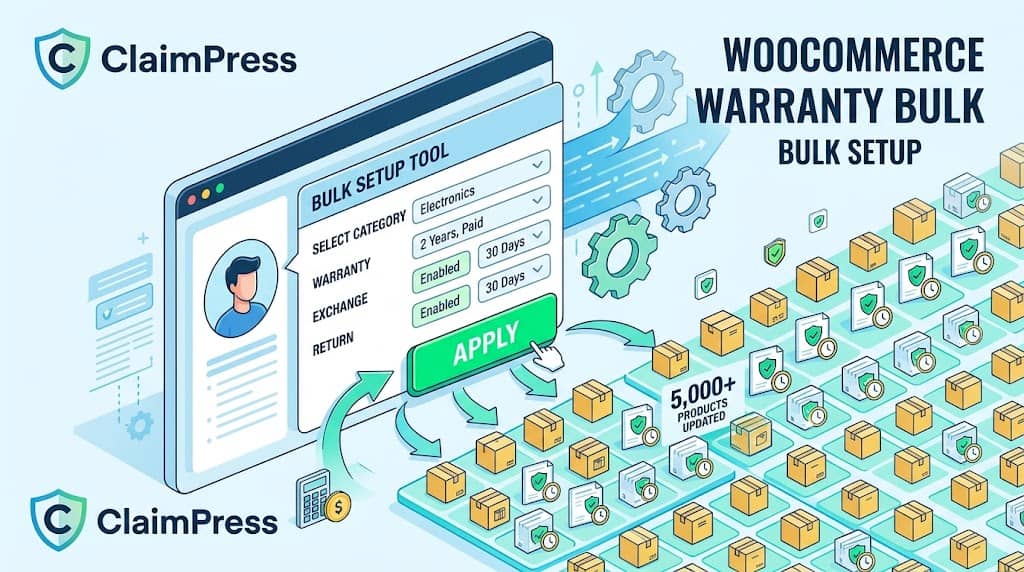
Configuring a returns and warranty management system for WooCommerce is straightforward for a store with 10 products. But what about a store with 500, 5,000, or 50,000 products? Editing each product individually to enable warranty, exchange, or return features would be completely impractical — a 5,000-product catalogue with even one minute per product represents over 83 hours of manual work.
ClaimPress’s Bulk Setup Tool solves this with category-based policy deployment that can apply warranty, exchange, or return settings to thousands of products simultaneously in seconds. Combined with the Products Coverage View for catalogue-wide policy auditing and the Analytics Dashboard for performance tracking, ClaimPress provides the operational tooling that makes a return and warranty management system for WooCommerce plugin practical at any scale.
Bulk Setup Tool: Apply Policies to Thousands of Products
The Bulk Setup Tool (introduced in ClaimPress v3.0.0) is accessible from ClaimPress → Bulk Setup. It allows configuring any combination of Warranty, Exchange, and Return policies for all products in a selected WooCommerce category in a single operation.
How Bulk Setup Works
- Select a product category: Choose from any existing WooCommerce product category. The tool applies to all products currently assigned to that category.
- Configure Warranty settings: Enable/disable Warranty for this batch, set the warranty type (Included or Paid), and configure the duration (number + unit: Days, Weeks, Months, Years).
- Configure Exchange settings: Enable/disable Exchange for this batch and set the exchange period.
- Configure Return settings: Enable/disable Return for this batch and set the return period.
- Apply: ClaimPress writes the configured settings to all products in the category as product meta, making them effective immediately.
🔥 Launch New Policy
Applied new 2-year warranty and 30-day return to your entire “Electronics” category (350 products) in seconds — not hours.
⏰ Update Existing Policy
Changed your “Apparel” exchange period from 30 to 60 days as a Black Friday promotion — applied to 800 products simultaneously.
🚫 Remove Policy
Discontinued the warranty program for “Clearance” items. Disabled warranty for all 200 clearance products in one operation.
Important: The Bulk Setup Tool overwrites existing ClaimPress settings on products in the selected category. If some products in the category have custom settings you want to preserve, use per-product configuration for those items rather than including them in a bulk operation. Use the Products Coverage View to audit your settings before and after bulk operations.
Products Coverage View
The Products Coverage View (ClaimPress → Products) provides a bird’s-eye view of your entire product catalogue and which ClaimPress features are active on each product. This is the policy audit tool — giving administrators visibility into the current state of their claims policy coverage across the entire store.
The Products view supports filtering by feature type:
- All Products: Every product in the catalogue with active ClaimPress settings visible
- Warranty Enabled: Filter to only products with the Warranty feature active
- Exchange Enabled: Filter to only products with the Exchange feature active
- Return Enabled: Filter to only products with the Return/Refund feature active
This view answers questions like: “Which of my 300 electronics products don’t have a warranty yet?” or “How many products have both exchange and return enabled?” — information that would require opening hundreds of individual product pages without this centralized view.
Per-Product ClaimPress Configuration
For products requiring custom policy settings different from the bulk-applied category defaults, ClaimPress adds a dedicated ClaimPress tab to the WooCommerce Product Data metabox on each product’s edit page. The tab contains three independent sections:
| Section | Configuration Fields |
|---|---|
| Warranty | Enable checkbox • Type: Included or Paid • Duration: number + unit (Days/Weeks/Months/Years) • Pro: Paid tier price points and custom labels |
| Exchange | Enable checkbox • Exchange period: number + unit |
| Return/Refund | Enable checkbox • Return period: number + unit |
Per-product settings take precedence over any bulk-applied category settings. Agencies and store managers can use the Bulk Setup for baseline policies and then fine-tune individual high-value or exceptional products with custom per-product settings without affecting the rest of the category.
ClaimPress Analytics Dashboard
The ClaimPress Analytics section provides overview statistics and trend data for the claims operation. Key metrics tracked:
- Total Claims: Overall claim volume for the reporting period
- Claims by Type: Breakdown between Warranty, Exchange, and Return claims — showing which claim type dominates volume
- Claims by Status: Distribution across Pending, In Progress, Approved, Rejected, Completed — showing pipeline health and resolution rate
- Total Products with Coverage: How many products have active ClaimPress policies (fixed in v2.8.0 to show accurate counts)
- Paid Warranty Count: Pro: Number of products with paid warranty tiers configured (corrected in v2.8.0)
Analytics data helps store managers identify patterns — a high volume of “Exchange” claims for a specific product may indicate a sizing issue or product description problem. A spike in “Warranty” claims after a supplier change may indicate a quality issue. These insights are actionable — they point to upstream product or operational problems that can be fixed before they generate more claims.
WooCommerce HPOS Compatibility
ClaimPress declares full compatibility with WooCommerce’s High-Performance Order Storage (HPOS) — the custom order tables system that replaces the traditional WordPress posts-based order storage. This compatibility is declared at plugin initialization via FeaturesUtil::declare_compatibility('custom_order_tables') and means ClaimPress works correctly whether HPOS is enabled or disabled on your WooCommerce installation.
HPOS compatibility is increasingly important as WooCommerce makes it the default option in newer versions. Stores migrating to HPOS or setting up new high-performance WooCommerce installations can use ClaimPress without compatibility concerns.
Use Cases: Who Benefits from Bulk Setup
🛒 Large Catalogues
Retailers with 500+ products who need to apply uniform warranty policies across product lines without product-by-product editing.
🏢 Agency Setups
Web agencies launching ClaimPress on a client’s existing WooCommerce store can apply policies to all products in one session rather than hours of per-product work.
🕑 Seasonal Policy Updates
Extend return periods during holiday seasons (“60-Day Holiday Return Policy”) for all products in a category simultaneously, then revert after the season ends.
🆕 New Supplier Launch
When onboarding a new supplier’s product line, apply the supplier’s warranty terms to all their products in one Bulk Setup operation.
Frequently Asked Questions
Can I apply different policies to different categories simultaneously?
The Bulk Setup Tool operates on one category per operation — but you can run multiple bulk setup operations sequentially. Apply a 2-year warranty to Electronics, then a 60-day exchange to Apparel, then a 14-day return to all products with a separate operation per category. Each operation completes quickly, so running several in a row is straightforward.
Will the Bulk Setup tool overwrite custom settings I’ve set on individual products?
Yes — this is why it’s important to audit your products in the Products Coverage View before running a Bulk Setup. If some products in a category have custom individual settings, run Bulk Setup first to apply the category default, then re-configure those individual products with their custom settings afterward. The per-product ClaimPress tab always takes effect for that specific product regardless of what bulk settings were applied.
Scale Your WooCommerce Warranty Policy to Your Entire Catalogue
ClaimPress’s Bulk Setup Tool applies warranty, exchange & return policies to thousands of products in seconds — no per-product editing required.
