

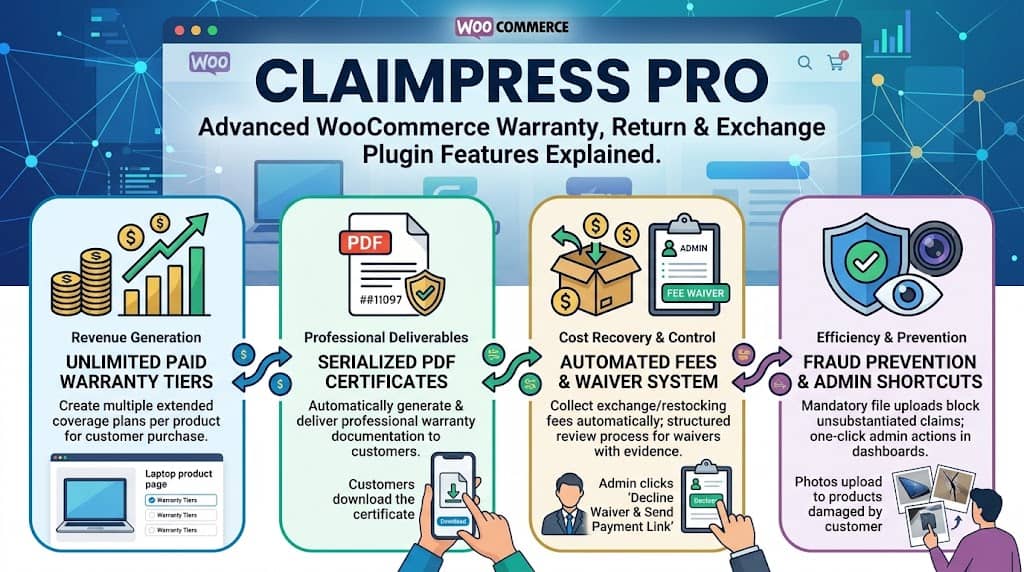
ClaimPress Free is a comprehensive return plugin WooCommerce stores can install without spending a cent — and for many smaller stores, the free version covers everything they need. But for high-volume merchants, agencies, and businesses treating after-sales claims as a profit center rather than a pure cost, ClaimPress Pro unlocks a set of advanced features that transform the plugin from a claims management tool into a revenue-generating operations upgrade.
This article covers every Pro-exclusive feature in ClaimPress — from unlimited paid warranty tier upsells to automated fee collection, mandatory fraud-prevention proof systems, PDF warranty certificates, and the enterprise RMA workflow. If you’re evaluating whether ClaimPress Pro is worth upgrading to, this is your complete guide.
ClaimPress Pro: What’s Unlocked
Revenue Generation
Paid warranty tier upsells, custom marketing labels, related protected products cross-sells
Cost Recovery
Automated exchange processing fees, restocking fees for returns — no manual invoicing
Fraud Prevention
Mandatory proof attachments, fee waiver system with evidence requirements
Professional Deliverables
Serialized PDF warranty certificates auto-delivered to customers on order completion
Unlimited Paid Warranty Tiers
This is ClaimPress Pro’s most significant revenue-generating feature. In the free version, warranties are included with the product at no extra charge. Pro unlocks paid warranty tiers — selectable coverage plans that customers purchase at checkout alongside the product.
The “unlimited” in unlimited tiers is significant: each product can have as many paid warranty options as makes commercial sense. A laptop could offer:
- “1-Year Standard Coverage” — $5
- “3-Year Extended Coverage” — $12
- “5-Year Premium Coverage” — $20
- “Lifetime Accidental Damage Protection” — $35
All four options appear as a selection on the product page. The customer picks the tier they want, and it’s added to the cart as a line item — processed through standard WooCommerce checkout with any payment gateway. For electronics and appliance stores, this extended warranty upsell model is standard practice among retailers — Best Buy, Amazon, and major electronics chains all offer extended warranty plans as a significant revenue stream. ClaimPress Pro brings this capability to any WooCommerce store.
Revenue Example: A store selling 100 laptops per month at $800 average price. If 25% of customers add a $15 extended warranty plan, that’s $375/month ($4,500/year) in pure additional revenue from the same customer base — with zero additional acquisition cost.
Serialized PDF Warranty Certificates
ClaimPress Pro includes a dedicated PDF generation engine that creates professional, serialized Warranty Certificates automatically when a customer purchases a warranty plan and their order reaches Completed status.
- Automatic generation: No manual certificate creation. The system generates the certificate immediately upon order completion
- Customer download: Certificates appear in the customer’s “Claimable Products” My Account section for download at any time
- Serialized: Each certificate has a unique serial number — enabling professional record-keeping, warranty validation, and fraud prevention for warranty claims
- Perceived value: A downloadable, professional PDF certificate significantly elevates the perceived quality of the warranty product — making higher-priced tiers feel more tangible and trustworthy
Automated Exchange Processing Fees
Product exchanges have real costs — return shipping labels, re-inspection, re-packaging, outbound reshipping. Without a fee automation system, these costs are typically absorbed or require manual invoicing outside WooCommerce. ClaimPress Pro automates the entire fee collection workflow:
- Admin sets a default Exchange Processing Fee in ClaimPress Settings (e.g., $10)
- Customer files an exchange claim
- System auto-creates a “Processing Fee” WooCommerce order for $10
- Claim locks in “Pending Payment” status
- Customer pays via standard checkout (no external invoicing tool needed)
- Payment confirmed → claim auto-advances to “Paid” → admin is notified it’s ready for processing
Automated Restocking Fees for Returns
Return restocking fees work identically to exchange processing fees in terms of automation, but apply specifically to return/refund claims. When a customer files a return:
- The configured Restocking Fee amount is collected as a separate WooCommerce order before the return is processed
- The return claim holds in “Pending Payment” until the fee is paid
- Once paid, the admin is notified and can process the return/refund (deducting the restocking fee from the customer’s refund if applicable)
Restocking fees serve a dual purpose: they recover partial costs and they deter casual/speculative returns where customers order multiple variants to try at home and return what they don’t want. The presence of even a small restocking fee significantly reduces return rates while remaining defensible to customers as a stated policy.
Customer File Attachments & Mandatory Proof System
ClaimPress Pro adds file attachment capability to claim submission forms. Customers can upload photos (JPG/PNG) or documents (PDF) to support their claim. Three enforcement modes are available:
📷 Optional
Customers may upload files but are not blocked from submitting without them. Useful when most claims are legitimate but photo evidence would be helpful.
🚫 Mandatory (Global)
All claims require a photo/document upload before submission. Blocks unsubstantiated claims entirely — strongest fraud prevention.
⚡ Auto-Required for Waivers
Standard claims have optional proof, but fee waiver requests automatically require proof — intelligent targeted enforcement.
Uploaded files are stored securely and displayed in the individual claim detail view in the admin dashboard alongside the claim description and customer details — giving admins the evidence they need to make informed approval/rejection decisions without requesting additional information from the customer.
Fee Waiver Request System
Fee automation creates a fairness challenge: what if the exchange/return is the store’s fault (wrong item shipped, DOA product)? Charging a customer a fee for a mistake you made is unfair and legally risky. The Fee Waiver system in ClaimPress Pro handles this with a structured review process:
Customer side: When filing an exchange or return claim, the customer can check “Request Fee Waiver” and explain why the exchange is the store’s responsibility. Proof upload automatically becomes mandatory for waiver requests — the customer must provide photo evidence of the error.
Admin side: The waiver request and evidence appear prominently in the claim detail view. Admin reviews and chooses:
- Approve Waiver: Claim proceeds to processing at no charge to the customer — one click
- Decline Waiver: Click “Decline Waiver & Send Payment Link” to instantly email the customer a payment link for the standard fee — no manual email writing needed
Fast-Action Admin Shortcuts
ClaimPress Pro adds purpose-built admin shortcuts that reduce the number of clicks required for common claim management actions:
- “Decline Waiver & Send Payment Link”: Single click from the claim dashboard instantly declines the waiver and emails the customer a payment link — previously requiring multiple separate steps
- Inline status dropdowns in the claims list for immediate status changes without navigating to individual claim pages
- AJAX-powered updates with instant visual confirmation — no page reload required for routine status management
Custom Marketing Labels
ClaimPress Pro allows replacing duration-based warranty labels with custom marketing names on product pages and in cart. Instead of displaying “36 Months” in a warranty tier dropdown, display “Gold Protection Plan.” Instead of “Lifetime,” display “No-Questions-Asked Guarantee.”
Benefit-focused, branded names outperform technical duration labels in conversion testing — they communicate value rather than time periods, which resonates more with purchase-motivated customers. Custom labels are particularly effective for extended warranty upsell, where emotional reassurance (“Complete Peace of Mind”) drives more selections than a technical specification (“60 Months”).
Related Protected Products (Warranty Upsell)
ClaimPress Pro’s Related Protected Products feature allows linking a “Protected” version of a product (one with a paid warranty included in the price) to its standard counterpart. This enables:
- Warranty Upsell Widget: A “Protected Version Available” widget shown on the standard product page, encouraging customers to consider the higher-priced protected version
- Cross-sell positioning: The protected product can appear in cross-sell sections during checkout and in cart abandonment follow-ups
- Average Order Value increase: Customers who might not select a warranty tier from a dropdown may respond to seeing the full protected product as an alternative — a different conversion path to the same upsell outcome
Enterprise RMA Workflow
ClaimPress Pro is described in its documentation as an enterprise-grade Returns Management Authorization (RMA) system for high-volume WooCommerce stores. The combination of Pro features creates a complete, automated RMA operation:
| RMA Challenge | ClaimPress Pro Solution |
|---|---|
| Fraudulent claims from customers faking defects | Mandatory proof photo requirements block unsubstantiated claims at submission |
| Manual invoicing for exchange/return fees | Automated fee orders lock claims until payment — zero manual invoicing |
| Customers claiming fee waivers without evidence | Fee Waiver system requires mandatory proof for all waiver requests |
| Extended warranty as untapped revenue | Unlimited paid warranty tiers at checkout + PDF certificates + custom labels |
| No professional warranty documentation | Serialized PDF warranty certificates auto-generated and delivered |
| Speculative returns (try-at-home buyers) | Restocking fees deter non-serious returns while remaining a stated, defensible policy |
Frequently Asked Questions
Is ClaimPress Pro a subscription or a one-time payment?
Licensing details for ClaimPress Pro are available at the Dominopress website. Visit dominopress.com/plugin/claimpress for current pricing, licensing terms, and plan options.
Can I upgrade from ClaimPress Free to Pro without losing existing data?
Yes. ClaimPress Pro is an add-on that extends the free plugin — it does not replace it. All existing claims, product settings, and configuration from the free version are preserved when upgrading to Pro. No data migration or re-configuration is required.
Do mandatory proof attachments work for both logged-in and guest customers?
Yes. The mandatory proof attachment setting applies to the claim submission form for all customer types — both the My Account “Claimable Products” form for logged-in users and the [claimpress_guest_form] shortcode form for guest customers. If mandatory proof is enabled, no claim (from any customer type) can be submitted without an attachment.
Turn Your WooCommerce Claims Department into a Revenue Engine
ClaimPress Pro — the complete return refund and exchange for WooCommerce plugin — with paid warranty upsells, automated fees, PDF certificates & fraud prevention.
