

Understanding your website’s traffic is not optional — it is the foundation of every content, marketing, and conversion decision you make. Google Analytics 4 is the industry standard for web measurement, but connecting it to WordPress and making the data actually usable requires more than pasting a tracking code into your theme. A good google analytics plugins for wordpress solution gives you the data you need, presented in the context you need it, without requiring you to switch between your WordPress dashboard and a separate analytics interface.
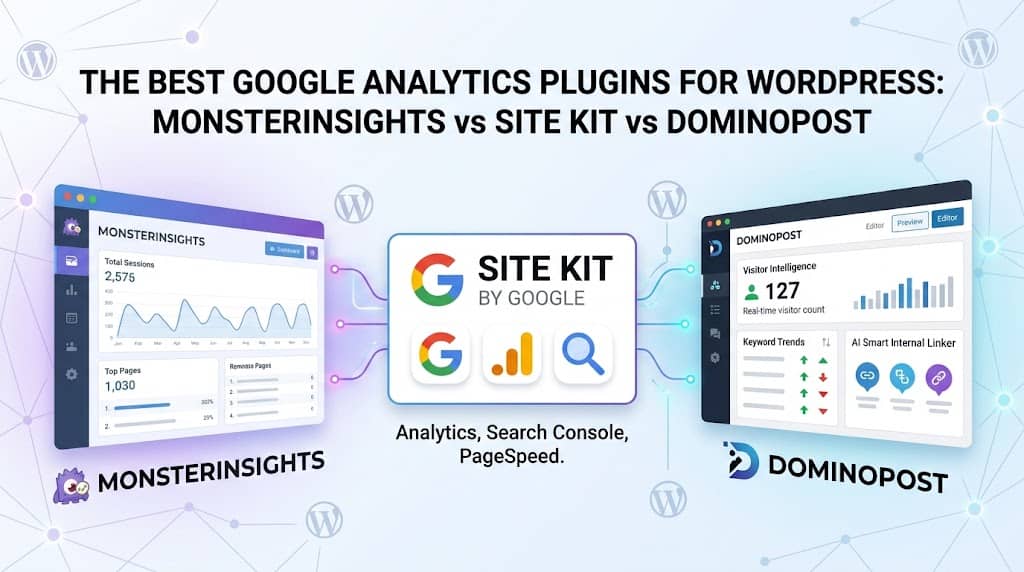
Three plugins dominate this conversation: MonsterInsights, Site Kit by Google, and DominoPost. Each takes a meaningfully different approach — MonsterInsights focuses on surfacing analytics data inside WordPress in a business-friendly format; Site Kit is the official Google plugin that also integrates Search Console, AdSense, and PageSpeed Insights; and DominoPost embeds Search Console data directly inside the post editor to inform content decisions at the point of creation.
This guide covers all three in depth, plus additional analytics plugins worth knowing about, so you can make the right choice for your workflow and goals.
Why You Need a WordPress Google Analytics Plugin
Raw Google Analytics 4 data is powerful but difficult. The GA4 interface requires significant familiarity to navigate, and most WordPress site owners don’t need the full depth of GA4’s event tracking and funnel reports — they need answers to specific questions:
- Which posts and pages are getting the most traffic right now?
- Where are visitors coming from — organic search, social, direct?
- What device types are my visitors using?
- Which keywords are driving traffic from Google?
- Which pages have the highest bounce rates?
- Are visitors finding what they’re looking for, or leaving quickly?
A good google analytics wordpress plugin translates these questions into accessible dashboards inside your WordPress admin — so you don’t need to be a data analyst to understand your site’s performance.
MonsterInsights: The Most Popular Google Analytics Dashboard for WordPress
Best for: Business sites, WooCommerce stores, and content publishers who want a comprehensive, beautifully presented analytics dashboard inside WordPress that non-technical team members can actually read and use.
MonsterInsights is the most widely used monsterinsights wordpress plugin with over 3 million active installations. It connects your WordPress site to Google Analytics 4 and presents the most important metrics in a clean, visual dashboard inside your WordPress admin — no need to log into Google Analytics separately to check your daily traffic.
The free version provides sessions, page views, traffic source breakdown, device split, and your top-10 pages and referrers. The Pro version unlocks significantly more: an e-commerce report showing revenue, conversion rate, and top products; a publisher report showing which authors and categories generate the most engagement; custom event tracking; enhanced link tracking (outbound clicks and file downloads); and a user journey report showing the pages visitors flow through before converting.
MonsterInsights Key Features
- GA4 connection via OAuth — no manual code editing required
- Clean dashboard with sessions, pageviews, and traffic sources
- Top pages and posts report with traffic and bounce rate per page
- Real-time visitor count widget in admin bar
- E-commerce tracking integration for WooCommerce (Pro)
- Publisher report by author, category, and post tag (Pro)
- Outbound link and file download click tracking (Pro)
- Custom dimension tracking — logged-in users, post type, category (Pro)
- GDPR compliance mode with anonymised IP tracking
- Performance score widget showing site speed and Core Web Vitals summary
MonsterInsights Limitations
- Free version is limited — advanced e-commerce and publisher reports require Pro at $99+/year
- No Google Search Console data in the dashboard — you need a separate connection for keyword data
- Heavier than minimal analytics solutions — loads some JavaScript on every page
Pricing: Free version available. Plus starts at $99/year; Pro at $199/year for e-commerce features.
Site Kit by Google: The Official All-in-One Google Services Plugin
Best for: WordPress site owners who want a single plugin that connects Google Analytics 4, Search Console, AdSense, PageSpeed Insights, and Tag Manager — all authenticated directly through Google’s own infrastructure.
The site kit by google wordpress plugin is the official WordPress plugin developed by Google itself. It is completely free and provides authentic, first-party connections to all of Google’s key webmaster services: Google Analytics 4, Google Search Console, Google AdSense, PageSpeed Insights, and Google Tag Manager.
The dashboard shows a unified view of your most important metrics: traffic from Analytics, search performance from Search Console (impressions, clicks, average position), revenue from AdSense, and speed scores from PageSpeed. Crucially, Search Console keyword data is surfaced for individual pages — you can see which queries are driving traffic to specific posts without leaving WordPress.
Site Kit Key Features
- Official Google authentication — the most secure and reliable connection method
- GA4 analytics with sessions, users, pageviews, and device/country breakdown
- Google Search Console data — impressions, clicks, CTR, and average position per page
- AdSense revenue dashboard (if monetised)
- PageSpeed Insights scores (mobile and desktop) for each page
- Google Tag Manager integration for custom event tracking
- Per-page analytics widget in the post editor showing individual page performance
- Completely free — no paywalled features
Site Kit Limitations
- The dashboard design is functional but less polished than MonsterInsights
- No e-commerce reporting — WooCommerce-specific insights require manual GA4 event configuration
- No author/category breakdown — less useful for large editorial teams
- Requires individual Google account authentication for each user who wants to see data
Pricing: Completely free. Developed and maintained by Google.
DominoPost: Search Console Analytics Built for Content Creators
Best for: Bloggers, SEO agencies, and content teams who want Search Console performance data and visitor analytics embedded directly in the WordPress post editor — alongside AI writing tools, internal linking, and broken link detection.
DominoPost approaches the wordpress google analytics problem from a content-first perspective. Rather than building a standalone analytics dashboard, DominoPost embeds performance tracking and Search Console data directly into the content creation workflow — so writers see their traffic and keyword data in the same place they edit their posts.
The SEO Analytics Dashboard connects to Google Search Console and presents Total Clicks, Impressions, Average CTR, and Average Position in a visual dashboard inside WordPress. It shows keyword trend intelligence — which queries are Growing vs. Declining — helping content teams know exactly which posts need to be updated. The Visitor Intelligence module tracks real-time visitors, session duration, device types, and geographic location using its own first-party tracking engine.
DominoPost Analytics Features
- Google Search Console Integration — Total clicks, impressions, CTR, and position tracking in WordPress admin
- Keyword Trend Intelligence (PRO) — Identifies growing vs. declining search queries for content refresh prioritisation
- Visitor Intelligence Dashboard — Real-time visitors, session duration, device split, country breakdown, most-viewed posts
- Top Performing Pages & Queries — See which pages get the most clicks and what users search to find them
- Interactive traffic charts — Breakdown by country and device type with date range selectors
- Content Update Reminders — Automated notifications when posts reach a defined staleness threshold
- Underperforming Posts Detection — Automatically flags posts with high bounce rates, short session times, or no internal links
- Real-time post editor sidebar — Word count, reading time, and keyword density shown live while writing
Why DominoPost Is Different
MonsterInsights and Site Kit are analytics plugins that happen to live in WordPress. DominoPost is a content creation plugin that happens to include analytics. This distinction matters for how you actually use the data:
- When you open a post to edit it, DominoPost’s analytics tell you how that specific post is performing before you start revising
- The AI Writer pulls keyword research data and generates content with built-in SEO optimisation — reducing the gap between data and action
- The AI Smart Internal Linker (PRO) uses your existing content’s traffic data to make intelligent link suggestions
- Content Update Reminders turn staleness detection from a passive report into an active editorial workflow
Pricing: Free version includes Visitor Intelligence, Search Console integration, and AI Writer (with Google Gemini). PRO adds Keyword Trend Intelligence, AI Smart Internal Linking, AI Smart Rewrite, and Focus Keyword Optimisation.
Head-to-Head Comparison: MonsterInsights vs Site Kit vs DominoPost
| Feature | MonsterInsights | Site Kit | DominoPost |
|---|---|---|---|
| Google Analytics 4 | ✅ | ✅ | ❌ (own tracker) |
| Search Console Data | ❌ | ✅ | ✅ |
| Per-page Keyword Data | ❌ | ✅ | ✅ |
| E-commerce Reporting | ✅ Pro | ❌ | ❌ |
| Author/Category Reports | ✅ Pro | ❌ | ❌ |
| AdSense Integration | ❌ | ✅ | ❌ |
| PageSpeed Insights | ❌ | ✅ | ❌ |
| Keyword Trend Intelligence | ❌ | ❌ | ✅ Pro |
| AI Writing Tools | ❌ | ❌ | ✅ |
| Internal Link Suggestions | ❌ | ❌ | ✅ Pro |
| Content Update Reminders | ❌ | ❌ | ✅ |
| Broken Link Checker | ❌ | ❌ | ✅ |
| Cost (Free tier) | ✅ | ✅ | ✅ |
Other Notable Google Analytics Plugins for WordPress
ExactMetrics
A rebranded version of MonsterInsights that was spun off as a separate product. It provides a similar dashboard and feature set, with slightly different pricing tiers. A solid alternative if you want MonsterInsights-style reporting at a lower cost entry point.
WPStatistics (Self-Hosted Analytics)
For sites that prefer not to send visitor data to Google, WP Statistics stores analytics data locally in your WordPress database. It tracks pageviews, visitors, and referrers without any third-party connection, making it the most privacy-compliant analytics solution available. No GDPR cookie consent is required for basic analytics.
Google Analytics for WordPress by Analytify
Analytify provides a clean, front-page analytics view directly in your WordPress dashboard. It focuses on simplicity — key traffic metrics in a readable format — without the complexity of MonsterInsights’s advanced reports. A good choice for smaller sites and solo bloggers who want google analytics wp plugin functionality without any learning curve.
Which Google Analytics Plugin Should You Choose?
You run a WooCommerce store
→ MonsterInsights Pro — the e-commerce report is unmatched for product-level revenue and conversion insights.
You want everything from Google, free
→ Site Kit by Google — the only plugin connecting GA4, Search Console, AdSense, and PageSpeed simultaneously at zero cost.
You’re a content creator or blogger
→ DominoPost — Search Console data, keyword trends, and underperforming post detection built directly into your writing workflow.
You want GDPR-compliant analytics
→ WP Statistics — server-side, cookieless tracking with no data sent to third parties.
Final Verdict: The Best Google Analytics Plugin for WordPress in 2026
There is no single winner when it comes to google analytics plugins for wordpress — the right answer depends on your goals.
Site Kit by Google is the best starting point for most sites: it’s free, built by Google, and connects the most important Google services in a single install. The limitation is that it doesn’t go particularly deep on any single data source.
MonsterInsights is the right choice when you need rich, business-friendly analytics reports that your entire team can read without GA4 training — especially for WooCommerce stores where product-level revenue data is essential.
DominoPost is the right choice when you want analytics embedded in the content workflow itself — where performance data informs what you write and how you update existing posts, not just what you observe from a dashboard. Its combination of Search Console integration, Visitor Intelligence, AI writing tools, and internal linking automation makes it unique in the category.
For maximum coverage, many professional sites run Site Kit for GA4 and AdSense monitoring and DominoPost for content analytics and editorial workflow — two complementary tools that don’t overlap and together cover every analytics use case a content-driven WordPress site could need.
