

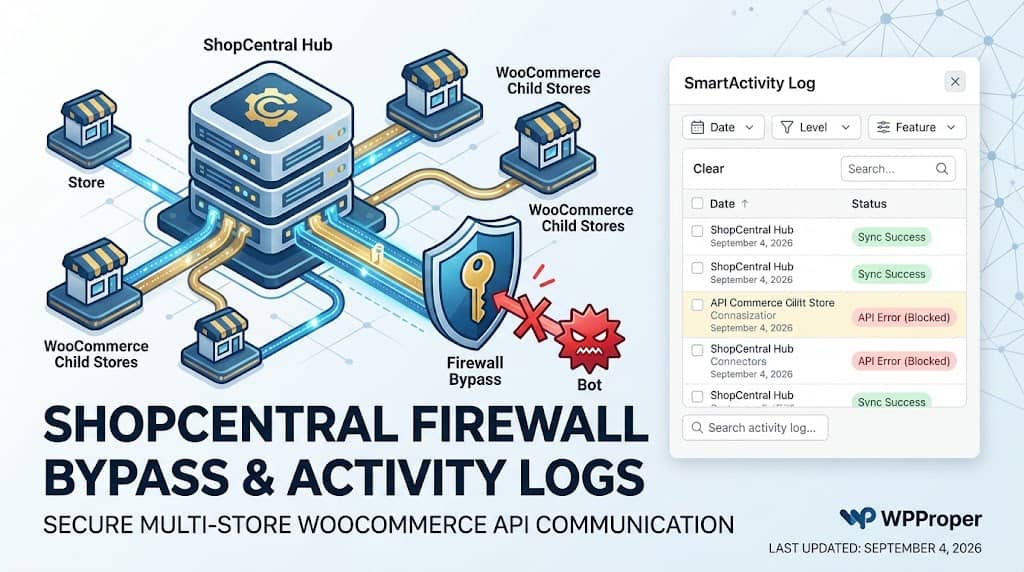
Managing a network of WooCommerce stores via REST API introduces a security and reliability challenge that most users don’t anticipate: modern hosting environments and CDN security services (Cloudflare, Sucuri, Bluehost’s built-in WAF) are configured to block automated API requests that don’t look like normal browser traffic. When ShopCentral’s hub site makes automated API calls to child stores for inventory sync, order import, or product updates, these calls can be silently blocked by the child store’s firewall — causing sync failures that are frustratingly difficult to diagnose.
ShopCentral’s Smart Firewall Bypass system addresses this directly with cryptographic request authentication, browser-mimicking headers, and a step-by-step Cloudflare WAF configuration UI — making automated API communication between hub and child stores reliable even on the most aggressively configured hosting environments. Combined with a comprehensive activity log system, ShopCentral provides the operational visibility and reliability infrastructure that serious multi store manager WooCommerce users require.
The Firewall Challenge in Multi-Store API Communication
ShopCentral’s hub-to-child communication uses the WooCommerce REST API — making HTTP requests from the hub server to child store URLs. From the child store’s hosting environment perspective, these requests look like automated bot traffic because:
- They originate from a server IP (the hub hosting server), not a browser
- They use a programmatic User-Agent string rather than a browser User-Agent
- They make repeated API requests in rapid succession (during bulk operations)
- They do not follow typical browser behavior patterns (no cookies, no referrer headers from a web page)
Cloudflare’s Bot Fight Mode, Bluehost’s server firewall, Sucuri’s WAF, and similar security systems commonly block these requests — returning 403 Forbidden or challenge responses instead of the expected WooCommerce API JSON. The result: ShopCentral operations appear to fail or return errors even though the API keys are correct and the connection is properly configured.
Common Symptom: A child store connects successfully in ShopCentral’s store setup (the initial API handshake works), but product sync or order import consistently fails. This is typically a firewall blocking the automated API calls after the initial authenticated connection, not an API key problem.
Smart Firewall Bypass System
ShopCentral’s Smart Firewall Bypass system (introduced in version 2.5.0 and significantly enhanced in 2.6.0) addresses the automated request blocking problem through several complementary mechanisms:
🔑 Shared Secret Generation
ShopCentral cryptographically generates a unique shared_secret per connected store. This secret is used to sign outbound API requests with a custom X-ShopCentral-Secret header that can be verified by a Cloudflare WAF rule to whitelist ShopCentral’s traffic.
🌐 Browser-Mimicking Headers
Outbound API calls inject modern browser-style User-Agent strings and headers to prevent Cloudflare Bot Fight Mode and similar bot detection systems from flagging ShopCentral’s automated requests as malicious traffic.
🚂 Branded User-Agent
A custom ShopCentral-Core User-Agent is injected into all outbound API calls, providing a recognizable identifier for Cloudflare WAF rules without requiring static IP whitelisting.
🛠 No Static IP Needed
The secret header + User-Agent approach means Cloudflare WAF rules can whitelist ShopCentral’s traffic based on cryptographic headers — no static IP whitelisting required, which is impractical for shared hosting environments.
Cloudflare WAF Integration: Interactive Setup UI
For child stores protected by Cloudflare, ShopCentral provides an interactive “Firewall Setup” modal in the Connected Stores management page. This modal provides:
- Ready-to-copy Cloudflare WAF rule expressions: Exact WAF rule expressions pre-populated with the store’s unique
shared_secret, formatted correctly for Cloudflare’s WAF custom rules interface — no WAF expertise required - Step-by-step instructions: A guided setup flow showing exactly where to paste the WAF rule in the Cloudflare dashboard
- One-click copy: The WAF rule expression is copyable in one click from the ShopCentral modal
- Per-store configuration: Each connected store generates its own unique shared secret and corresponding WAF rule — allowing granular, store-specific firewall rules without a shared secret that applies to all stores
Example Cloudflare WAF expression (auto-generated by ShopCentral):(http.request.headers[“x-shopcentral-secret”] eq “abc123xyz789…” and http.request.uri.path contains “/wp-json/wc/”)
This WAF rule tells Cloudflare: “Allow any request to WooCommerce API endpoints that includes the correct ShopCentral secret header” — whitelisting ShopCentral’s automated calls while still blocking genuine bot traffic that lacks the secret.
Branded API Requests
In addition to the secret header, all outbound API calls from ShopCentral inject a branded ShopCentral-Core User-Agent string. This serves two purposes:
- WAF allowlisting by User-Agent: Cloudflare WAF rules can alternatively be configured to allow requests with the
ShopCentral-CoreUser-Agent to WooCommerce API endpoints - Server log identification: Requests from ShopCentral appear as
ShopCentral-Corein child store server access logs rather than generic programmatic User-Agents, making traffic analysis and debugging straightforward
ShopCentral Activity Logs
ShopCentral’s centralized activity log viewer (ShopCentral Logs) provides a complete, searchable audit trail of all ShopCentral operations — essential for diagnosing sync failures, API errors, and automation execution issues. The log viewer includes:
| Log Feature | Capability |
|---|---|
| Date Filter | Filter log entries by date range to narrow diagnosis to a specific incident window |
| Feature Filter | Filter by ShopCentral feature (Order Sync, Product Sync, Firewall, Automation, Export, etc.) |
| Level Filter | Filter by log severity level: Info, Warning, Error — quickly surface failures without wading through informational entries |
| Expandable Context | Each log entry includes expandable context details — the full API response, error message, or relevant data payload for deep debugging |
| Copy to Clipboard | Copy log entries to clipboard for pasting into support tickets or sharing with developers |
| Bulk Delete | Select and delete specific log entries; “Clear All” button removes the entire log history |
| Accessible from Dashboard | ShopCentral → ShopCentral Logs in the WordPress admin menu — no separate login or tool required |
Log Management & Auto-Cleanup
Unchecked activity logging can accumulate large amounts of data in the hub site’s database over time, particularly for high-volume stores with frequent sync operations. ShopCentral handles this automatically:
- WP Cron auto-cleanup: A daily WP Cron job (
shopcentral_cleanup_logs_cron) automatically deletes log entries older than 30 days - Manual cleanup: The Bulk Delete and Clear All functions in the Log viewer allow manual purging of log entries at any time
- 30-day rolling window: The default 30-day retention period provides sufficient history for operational diagnosis while preventing unbounded database growth
This auto-cleanup mechanism means ShopCentral’s logging system does not require manual maintenance — the database impact of activity logging is self-regulating, consistent with ShopCentral’s broader design principle of providing operational value without creating technical debt on the hub site.
Frequently Asked Questions
Do I need to configure Cloudflare WAF rules for ShopCentral to work?
Only if your child stores are behind Cloudflare with Bot Fight Mode or custom WAF rules that block server-to-server API requests. Many WordPress hosting environments do not have Cloudflare enabled or have it in a mode that allows API traffic without WAF intervention. If you experience sync failures where the API connection tests successfully but operations (sync, import) fail, check whether Cloudflare is blocking the automated requests and use ShopCentral’s Firewall Setup modal to generate the Cloudflare WAF allowlist rule.
Where does ShopCentral store activity logs?
ShopCentral’s activity logs are stored in the hub site’s WordPress database in a dedicated ShopCentral logs table (created by ShopCentral_DB on plugin activation). Logs older than 30 days are automatically purged by daily WP Cron. The log table is separate from WooCommerce’s own log system (WC_Logger), keeping ShopCentral’s operational logs isolated and independently manageable.
Reliable Multi-Store API Communication, Secured
ShopCentral’s Smart Firewall Bypass and Activity Logs ensure your WooCommerce store network operates reliably, transparently, and securely.
