

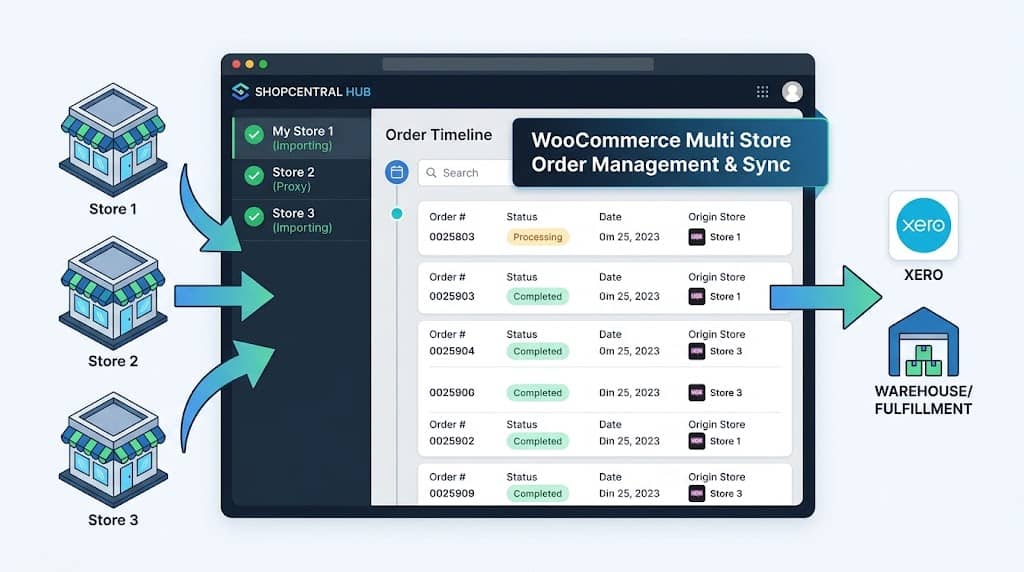
For any business operating multiple WooCommerce stores, order management is the highest-frequency daily operation — checking new orders, updating statuses, verifying fulfilment, resolving customer issues. Without a multi store manager WooCommerce solution, this means repeating the same workflow across every store admin panel every single day. ShopCentral centralizes the entire order management workflow into one dashboard and, critically, provides a full background order import and sync system that makes all child site orders available as real WooCommerce orders on the hub site — enabling accounting, warehouse, and fulfilment integrations to work across the entire store network from one installation.
Order Management in a Multi-Store WooCommerce Context
Without a centralized order management tool, a merchant operating 5 WooCommerce stores might check 5 separate WooCommerce order screens every morning, manually track fulfilment across 5 separate status dashboards, and manually compile a combined order count for reporting. With ShopCentral as a multi store plugin for WooCommerce, the entire order management workflow moves to one interface.
ShopCentral’s order management system operates in two modes:
- Live Proxy View (Default): Orders are fetched in real time from connected stores’ REST APIs and displayed in the ShopCentral dashboard. No data is permanently written to the hub database. Ideal for operational oversight without accounting integration needs.
- Order Import & Sync (Optional): Child site orders are imported as real WooCommerce orders on the hub site, complete with customers, line items, metadata, and ACF fields. Enables full compatibility with accounting tools, warehouse management systems, and any WooCommerce order-based plugin on the hub.
Central Order Timeline & Advanced Filters
The Order Timeline is a powerful chronological feed of orders across all connected stores, providing real-time visibility without switching between sites. The order list view includes:
🔍 Advanced Filtering
Filter by order status (processing, completed, on-hold, refunded, cancelled), date range, or customer name/email. Find specific orders in seconds across thousands of records.
📄 Smart Pagination
Configurable per-page display: 10, 25, 50, or 100 orders per page. First/Previous/Next/Last navigation buttons for fast traversal of large order histories.
🏢 Store Attribution
Every order in the timeline shows which store it originated from — critical when orders from different sites appear in the same feed.
📅 Date Picker
Standardized date labels: Today, Yesterday, This Month, This Year, All Time — consistent across all dashboard sections for quick time-period switching.
Background Order Import & Sync
ShopCentral’s Order Import system (introduced in version 2.6.0) is the most technically significant feature for businesses that need orders from all stores available in one WooCommerce installation for accounting, warehouse, or fulfilment tool integration. Key capabilities:
| Feature | Detail |
|---|---|
| Real WooCommerce Orders | Child site orders are created as real WooCommerce orders on the hub — not just references or metadata — enabling full plugin compatibility |
| Complete Data Transfer | Line items, billing/shipping addresses, coupons, fees, metadata, and ACF fields all transferred |
| Action Scheduler | Background queue processing with chunked batches (50 orders per batch) for reliable large-volume imports without timeouts |
| Multiple Store Support | Import orders from multiple connected stores simultaneously with real-time progress tracking per store |
| Duplicate Prevention | Intelligent duplicate detection prevents re-importing the same order if the import is run multiple times |
| Configurable Batch Size | 50 to 50,000 orders per batch — configurable based on server capacity and import volume |
| Progress Bar & Cancel | Real-time progress display during manual sync with cancel button support |
Order import is enabled per child store — a toggle switch in the Connected Stores management page controls whether orders from each store are imported. Hub site protection ensures the main site’s own orders are not re-imported.
Webhook-Powered Real-Time Sync: In addition to manual batch import, ShopCentral uses WooCommerce REST API webhooks on child sites to push new orders to the hub in near real-time. The webhook payload includes billing, shipping, line items, coupons, fees, and all metadata for complete order reconstruction on the hub site. This means the hub’s WooCommerce order database stays continuously current without manual sync.
Customer Sync by Email
When orders are imported from child sites, ShopCentral automatically handles customer account linkage on the hub:
- Email-based matching: If a WordPress user with the same email exists on the hub site, the imported order is linked to that user account automatically
- Auto-creation: If no matching user exists, a new customer profile is created on the hub site from the order’s billing email and contact details
- Cache-optimized lookups: Customer email lookups use static caching to reduce database queries during large batch imports — critical for performance when importing tens of thousands of orders
- WooCommerce email notifications: Standard WooCommerce email notifications for imported customers are properly triggered (or can be suppressed depending on configuration)
Retry System & Action Scheduler Integration
Order sync failures (due to network issues, API rate limits, or temporary child site downtime) are handled by ShopCentral’s automatic retry system:
- Automatic retry via WP Cron: Failed order push/import operations are automatically retried every 5 minutes via WP Cron
- Action Scheduler integration: Async background actions use WooCommerce’s built-in Action Scheduler library for reliable, high-volume queue processing
- Chunked processing: Large imports are broken into 50-order chunks to prevent PHP timeouts on shared hosting
- Comprehensive logging: All import activity (successes, failures, retries) is recorded in ShopCentral’s activity logs for diagnostic review
HPOS Compatibility
WooCommerce’s High-Performance Order Storage (HPOS) moves orders from the wp_posts and wp_postmeta tables to dedicated, optimized order tables (wc_orders, wc_order_items, etc.). ShopCentral is fully HPOS-compatible — all order management, import, and sync features use WooCommerce’s CRUD methods rather than direct post meta access, ensuring correct operation whether HPOS is enabled or disabled on the hub and child sites.
Accounting Integration: Xero, Warehouse Tools & WooCommerce Plugins
The reason ShopCentral’s order import creates real WooCommerce orders (rather than a custom database table) is to ensure full compatibility with the WooCommerce plugin ecosystem on the hub site. Once orders from all stores are imported as WooCommerce orders:
- Xero for WooCommerce picks up all imported orders for invoice and accounting sync
- Warehouse management plugins that hook into WooCommerce order status changes process orders from all child sites
- Shipping and fulfilment plugins generate labels and dispatch notifications for imported orders
- Any WooCommerce order hook (
woocommerce_new_order,woocommerce_order_status_changed) fires normally for imported orders
This architecture makes ShopCentral the most integration-friendly woocommerce multi store manager available — you are not locked into ShopCentral’s own reporting or fulfilment UI. Any existing WooCommerce tooling on the hub site gains visibility of all stores’ orders automatically.
Frequently Asked Questions
Will importing orders from child sites cause database bloat on the hub?
Yes — importing child site orders into the hub’s WooCommerce database will increase the hub’s database size proportional to the number of orders imported. This is expected and necessary for accounting/warehouse integrations that require real WooCommerce orders. For stores where accounting integration is not required, the default live proxy view mode (no import) keeps the hub database unchanged regardless of how many orders exist on child sites.
Can I run order import for some stores and proxy view for others?
Yes. The Order Import toggle is configured per child store in ShopCentral’s Connected Stores settings page. You can enable import for stores that require accounting integration while leaving other stores in live proxy view mode.
Centralize Order Management Across All Your WooCommerce Stores
ShopCentral’s background order sync is compatible with Xero, warehouse tools, and all WooCommerce plugins.
