

Product and inventory consistency across multiple WooCommerce stores is one of the most operationally demanding challenges for multi-store merchants. When the same product is sold across several stores, keeping prices aligned, stock levels accurate, product descriptions consistent, and images up to date manually across every store admin is a process that consumes significant time and introduces a high risk of errors — stale prices, overselling from stock not being deducted across stores, or outdated descriptions confusing customers.
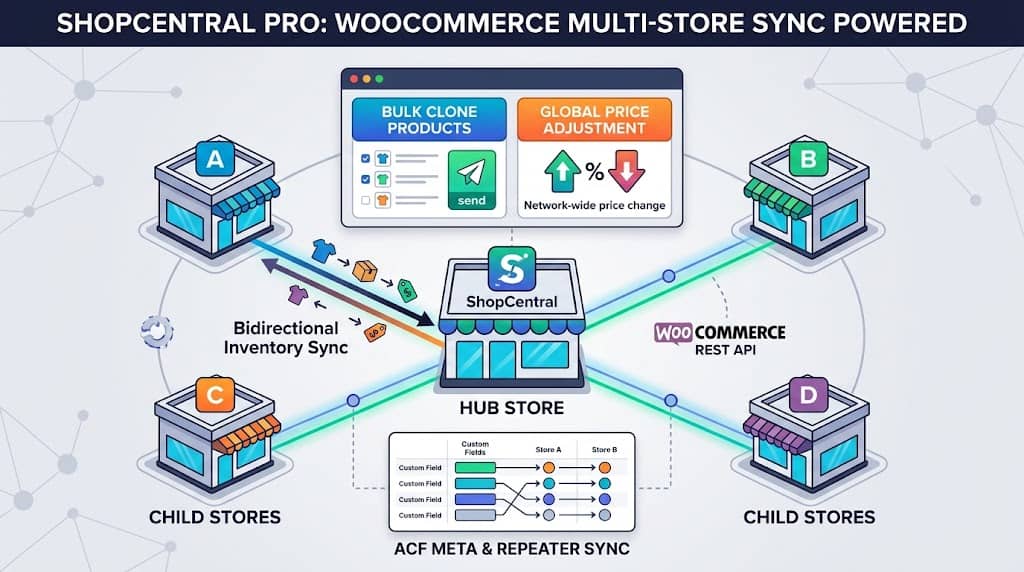
ShopCentral’s product and inventory sync system is a Pro-tier feature of this multi store manager WooCommerce plugin that eliminates manual product management across stores — automatically synchronizing stock levels network-wide when a sale occurs, enabling one-click product cloning to new stores, and applying global price changes across every connected store simultaneously. This article covers every product sync capability in ShopCentral.
Why Product Sync Matters Across Multiple WooCommerce Stores
Consider a merchant selling a limited-edition product across 4 regional WooCommerce stores with 100 units of shared inventory. Without cross-store inventory sync:
- All 4 stores show 100 units available, but the physical inventory is shared
- Customers on all 4 stores can order up to 100 units simultaneously
- If Store A sells 60 units, Stores B, C, and D still show 100 units
- The merchant oversells by up to 300 units before manually updating stock
With ShopCentral’s bidirectional inventory sync, when Store A sells 60 units, all connected stores’ stock levels are automatically reduced to reflect the actual remaining inventory — preventing overselling across the entire network.
Beyond stock sync, product cloning — pushing a new product to multiple stores — and global price adjustments — running a network-wide sale or cost-of-goods adjustment — are core operational workflows for any growing multi store WooCommerce network that ShopCentral automates completely.
Product & Inventory Sync System
ShopCentral’s product sync system allows pushing product data from the hub store to connected child stores via the WooCommerce REST API. Key sync capabilities:
- Product matching by SKU: Products are matched across stores by SKU for accurate cross-store updates — avoiding misidentification when product names differ between stores
- Categories and tags sync: Categories and tags are created and attached on remote/child stores via REST API if they don’t exist, maintaining taxonomy consistency
- Deploy warning system: A deployment warning is displayed if the target product does not exist in the destination store with a matching SKU — preventing accidental pushes to incorrect products
- Detailed error reporting: Errors from the WooCommerce API during deploy (invalid data, missing fields, API permission issues) are displayed with full detail for immediate diagnosis
- Redesigned Sync Modal: 2-column layout with warning info providing a clear overview of source and destination before confirming the sync operation
Bidirectional Inventory Sync
Bidirectional inventory sync (introduced in version 2.5.0) is the flagship product management feature for merchants selling shared inventory across multiple stores. When a sale occurs on any connected store:
- The sale event triggers ShopCentral’s inventory sync system on the child store
- The hub site receives the stock change notification
- ShopCentral calculates the new stock level based on the units sold
- The updated stock quantity is pushed to all other connected stores with the same SKU
- All stores’ product stock levels reflect the current real-world inventory in near real-time
This is “bidirectional” because stock reductions propagate from any store in the network outward to all others — not just from hub to child. A sale on Child Store B reduces stock on the Hub, Child Store A, Child Store C, and Child Store D simultaneously.
Important: Bidirectional inventory sync requires Pro plan and works via WooCommerce REST API calls. For it to function correctly across all stores, each store needs sufficient API rate limits to handle the incoming stock update requests. ShopCentral’s smart firewall bypass system (Cloudflare WAF integration) prevents these automated API calls from being blocked by security firewalls.
Recursive Variable Product Sync
Variable products — products with multiple variants (size, colour, style) — are significantly more complex to sync than simple products because each variation has its own SKU, price, and stock level. ShopCentral’s recursive variable product sync handles the complete variation tree:
- All variations included: Every product variation (not just the parent product) is synced to child stores
- Attributes synced: Product attributes (Size: S/M/L/XL, Colour: Red/Blue/Green) are created on child stores if they don’t exist
- Per-variation stock: Each variation’s individual stock quantity is synced — not a single aggregate for the parent product
- Variation pricing: Individual variation prices are included in the sync, preserving per-size or per-colour pricing differences
This recursive approach means pushing a complex variable product with 30 variations (3 sizes × 10 colours) to 5 connected stores is a single operation in ShopCentral — rather than 150 manual product variations to create and price individually.
Bulk Clone Products Across Stores
When launching a new WooCommerce store within an existing network — a new regional site, a new brand store, a seasonal pop-up store — populating it with the existing product catalogue is the first major task. Without a bulk clone tool, this means manually creating or importing each product on the new site.
ShopCentral’s Bulk Clone feature allows selecting products from any connected store and pushing them to one or more other stores in a single operation. Each cloned product is created on the destination store via the WooCommerce REST API with its full data — title, description, images, price, stock, attributes, and variations. Categories and tags are created on the destination store if they don’t exist.
For agency users managing client store launches, bulk clone transforms new store setup from a multi-hour manual process into a single-click operation — one of the most time-saving capabilities in ShopCentral’s Pro feature set as a multi store plugin for WooCommerce.
Global Price Adjustments
Running a network-wide sale, responding to a supplier price change, or applying a consistent margin adjustment across all stores traditionally requires logging into each store, navigating to products, and manually updating prices one by one. ShopCentral’s Global Price Adjustment feature handles this in one operation:
- Percentage-based adjustments: Increase or decrease prices by a percentage across selected products and stores
- Multiple store support: Apply the adjustment to one, several, or all connected stores simultaneously
- Sequential store updates: Price updates are applied to each store sequentially with progress tracking
- Warning before apply: A redesigned Global Price Modal with warning info ensures the operator reviews the scope of changes before confirming
- Variable product support: Price adjustments apply to variable product variations, not just simple product base prices
Use Case: A merchant running a 20% Black Friday sale across 6 stores can apply the discount to all stores from one ShopCentral operation, then reverse it after the sale — a process that would otherwise require updating prices in 6 separate WooCommerce admin panels.
Custom Meta & ACF Repeater Sync
Many WooCommerce stores use Advanced Custom Fields (ACF) to store additional product data beyond WooCommerce’s standard fields — custom specifications, downloadable content metadata, size charts, ingredient lists, or any structured data specific to the business. When products are synced between stores, this custom metadata must be transferred along with the standard product fields.
ShopCentral’s Custom Meta & ACF Repeater Sync (introduced in version 2.6.0) provides:
- Product metadata sync: Custom product meta fields are transferred between central and child stores using WooCommerce CRUD methods
- ACF auto-detection: When ACF is active on the hub site, ShopCentral automatically detects registered ACF field groups and includes both field names and field keys in the sync payload
- ACF Repeater support: ACF Repeater fields — which store arrays of sub-fields — are handled correctly in the sync, preserving the complex nested data structure
This capability is particularly valuable for agencies managing stores for clients in specialized industries (furniture, food & beverage, supplements, fashion) where product data is rich and stored in custom ACF field groups rather than standard WooCommerce fields.
Frequently Asked Questions
Is product sync available in the free version of ShopCentral?
No. Product & inventory sync, bidirectional inventory sync, bulk clone, global price adjustments, and ACF meta sync are Pro-tier features. The free version provides live proxy viewing of product data (stock levels, product lists) from connected stores, but active sync and push operations require a Pro plan.
Does bidirectional sync work instantly when a sale occurs?
Bidirectional inventory sync is near-real-time — triggered by WooCommerce order events on the child stores which then call ShopCentral’s API to propagate the stock change. The actual propagation delay depends on API response times between stores and any queuing from Action Scheduler, typically completing within seconds on fast hosting environments.
Sync Products & Inventory Across All Your WooCommerce Stores
ShopCentral Pro’s bidirectional sync, bulk clone, and global price tools eliminate manual product management across your store network.
